| title | Connect to master and HDFS Big data clusters |
|---|---|
| description | Learn how to connect to the SQL Server master instance and the HDFS/Spark gateway for a SQL Server Big Data Cluster. |
| author | MikeRayMSFT |
| ms.author | mikeray |
| ms.reviewer | mihaelab |
| ms.date | 11/04/2019 |
| ms.topic | conceptual |
| ms.prod | sql |
| ms.technology | big-data-cluster |
[!INCLUDEtsql-appliesto-ssver15-xxxx-xxxx-xxx]
This article describes how to connect to a [!INCLUDEbig-data-clusters-2019] from Azure Data Studio.
- A deployed SQL Server 2019 big data cluster.
- SQL Server 2019 big data tools:
- Azure Data Studio
- SQL Server 2019 extension
- kubectl
- azdata
To connect to a big data cluster with Azure Data Studio, make a new connection to the SQL Server master instance in the cluster. Here's how.
-
Find the SQL Server master instance endpoint:
azdata bdc endpoint list -e sql-server-master[!TIP] For more information on how to retrieve endpoints see Retrieve endpoints.
-
In Azure Data Studio, press F1 > New Connection.
-
In Connection type, select Microsoft SQL Server.
-
Type the endpoint name you found for SQL Server master instance in the Server name textbox (for example: <IP_Address>,31433).
-
Choose your authentication type. For the SQL Server master instance running in a big data cluster, only Windows Authentication and SQL login are supported.
-
If you're using SQL Login, enter your SQL login User name and Password.
[!TIP] By default, the user name SA is disabled during big data cluster deployment. A new sysadmin user is provisioned during deployment with the name and password corresponding to the AZDATA_USERNAME and AZDATA_PASSWORD environment variables, which were set either before or during deployment.
-
Change the target Database name to one of your relational databases.

-
Press Connect, and the Server Dashboard should appear.

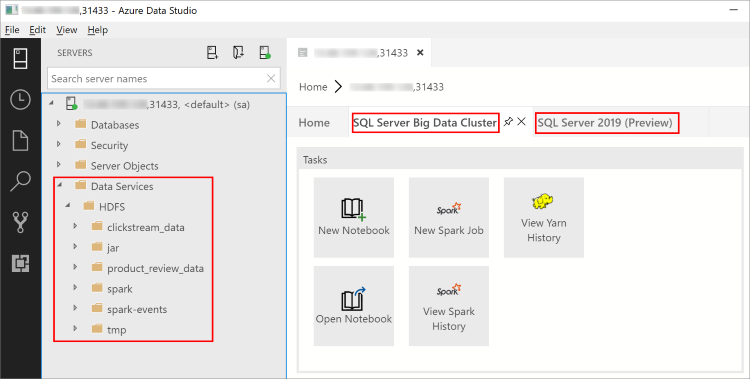
With the February 2019 release of Azure Data Studio, connecting to the SQL Server master instance also enables you to interact with the HDFS/Spark gateway. This means that you do not need to use a separate connection for HDFS and Spark that the next section describes.
-
The Object Explorer now contains a new Data Services node with right-click support for big data cluster tasks, such as creating new notebooks or submitting spark jobs.
-
The Data Services node also contains an HDFS folder to allow you to explore the contents of the HDFS and perform common tasks involving the HDFS (for example, creating an external table or opening a notebook to analyze the HDFS contents).
-
The Server Dashboard for the connection also contains tabs for SQL Server big data cluster and SQL Server 2019 when the extension is installed.

For more information about [!INCLUDEbig-data-clusters-2019], see [What are [!INCLUDEbig-data-clusters-2019]](big-data-cluster-overview.md).