| title | Task 6: Setting Synonyms | Microsoft Docs |
|---|---|
| ms.custom | |
| ms.date | 04/27/2017 |
| ms.prod | sql-server-2014 |
| ms.reviewer | |
| ms.technology | data-quality-services |
| ms.topic | conceptual |
| ms.assetid | b7d35ee9-d1c9-41d9-bbc5-0ca7db93e54d |
| author | lrtoyou1223 |
| ms.author | lle |
| manager | craigg |
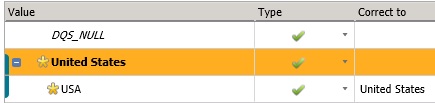
In this task, you set two domain values, USA and United States, of the Country domain as synonyms with United States as the leading value. Since the Use Leading Values option was selected when creating the Country domain, any USA values for the Country domain will be output as United States (as United States is the leading value). See Change Domain Values for more details.
-
Select Country from the list of domains.
-
Switch to the Domain Values tab.
-
Click Add new domain value button on the toolbar.
-
Type USA for the value and press ENTER.
-
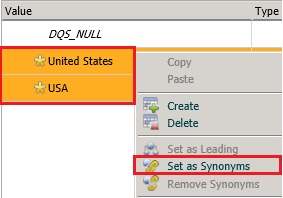
Multiselect United States and USA using CTRL or SHIFT keys, right-click the selected items, and then click Set as Synonyms. DQS groups these values and designate one of the values as the leading value that the other values are replaced with.
-
Notice that United States is set as the leading value. If you want USA to be the leading value, you can right-click on USA and select Set as Leading option. For this tutorial, we use United States as the leading value.