| title | Task 7: Creating a Composite Domain | Microsoft Docs |
|---|---|
| ms.custom | |
| ms.date | 03/06/2017 |
| ms.prod | sql-server-2014 |
| ms.reviewer | |
| ms.technology | data-quality-services |
| ms.topic | conceptual |
| ms.assetid | ae778647-1df0-4952-9a69-0ef6177eea9c |
| author | lrtoyou1223 |
| ms.author | lle |
| manager | craigg |
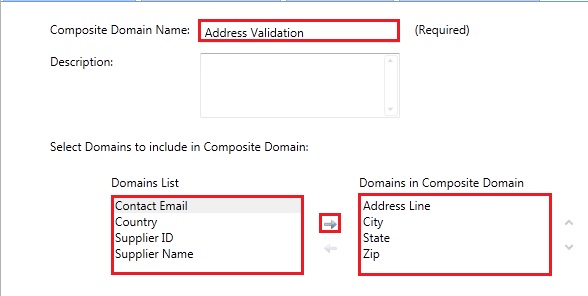
In this task, you create a composite domain, Address Validation, which comprises Address Line, City, State, and Zip domains. A composite domain lets you define a cross-domain rule that involves multiple domains in a rule. There are other advantages to a composite domain such as being able to parse a field value into multiple domains. For example, a value for a Full Name field can be parsed into separate First Name, Middle Name, and Last Name domains. In this tutorial, you only define a cross-domain rule. See Managing a Composite Domain for more details.
-
In the left pane, click Create a composite domain button on the toolbar.

-
Enter Address Validation for the Composite Domain Name.
-
From the domain list select Address Line, City, State, and Zip and click right arrow to add them to the Domains in Composite Domain list.
-
Click OK to close the dialog box.

