| title | Task 2 (Optional): Creating a MDS Subscription View using Master Data Manager | Microsoft Docs |
|---|---|
| ms.custom | |
| ms.date | 03/06/2017 |
| ms.prod | sql-server-2014 |
| ms.reviewer | |
| ms.technology | data-quality-services |
| ms.topic | conceptual |
| ms.assetid | f3da8219-e0cb-4848-95ca-285a76ec1ba9 |
| author | lrtoyou1223 |
| ms.author | lle |
| manager | craigg |
In this task, you create a subscription view to expose the Supplier entity in the Suppliers model to other applications. You do not consume this view in the current version of the tutorial.
-
Switch to the main page of Master Data Manager (http://localhost/MDS) by clicking SQL Server 2012 Master Data Services at the top.
-
Click Integration Management.
-
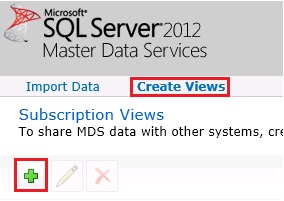
Click Create Views on the menu bar.
-
Click + (Plus) icon on the toolbar to create a subscription view.
-
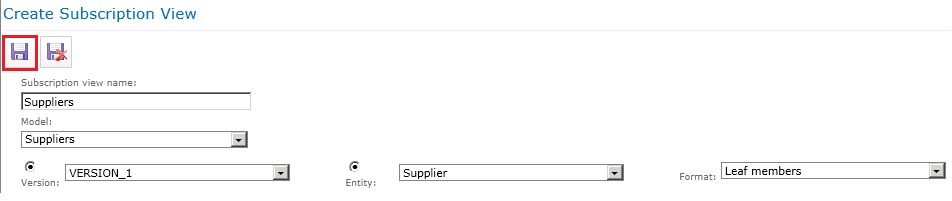
In the Create Subscription View pane, type Suppliers for Subscription view name.
-
Select Suppliers for Model.
-
Select VERSION_1 for Version.
-
Select Supplier for Entity.
-
Select Leaf members for Format.
-
Click Save on the toolbar to save the subscription view. This action creates a view in SQL Server named Suppliers. You can verify this using SQL Server Management Studio (SSMS).

