| title | Task 3 (Optional): Reviewing the Subscription Views | Microsoft Docs |
|---|---|
| ms.custom | |
| ms.date | 03/09/2017 |
| ms.prod | sql-server-2014 |
| ms.reviewer | |
| ms.technology | data-quality-services |
| ms.topic | conceptual |
| ms.assetid | 3f1d3eb7-2baa-4215-b040-0b41e3d10740 |
| author | lrtoyou1223 |
| ms.author | lle |
| manager | craigg |
In this task, you confirm that the SQL views are created by using SQL Server Management Studio.
-
Launch SQL Server Management Studio. Click the Start button, click All Programs, click Microsoft SQL Server 2012, and then click SQL Server Management Studio.
-
In the Connect to Server window, set Server Type to Database Engine, type the server name (or select (local), and select appropriate authentication, and click Connect.
-
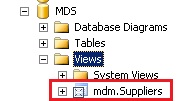
In the Object Explorer pane, expand Databases, expand MDS, and then expand Views.
-
Confirm that you see the mdm.Suppliers view in the list.

Task 4: Creating an SSIS Project using SQL Server Data Tools