| title | Task 2: Adding Domain Values Manually | Microsoft Docs |
|---|---|
| ms.custom | |
| ms.date | 12/29/2017 |
| ms.prod | sql-server-2014 |
| ms.reviewer | |
| ms.technology | data-quality-services |
| ms.topic | conceptual |
| ms.assetid | aa6898db-f54b-4e98-84e4-ac64e48c3561 |
| author | lrtoyou1223 |
| ms.author | lle |
| manager | craigg |
In this task, you add a value for the Country domain manually. See Change Domain Values topic for more details about the fields on this page.
-
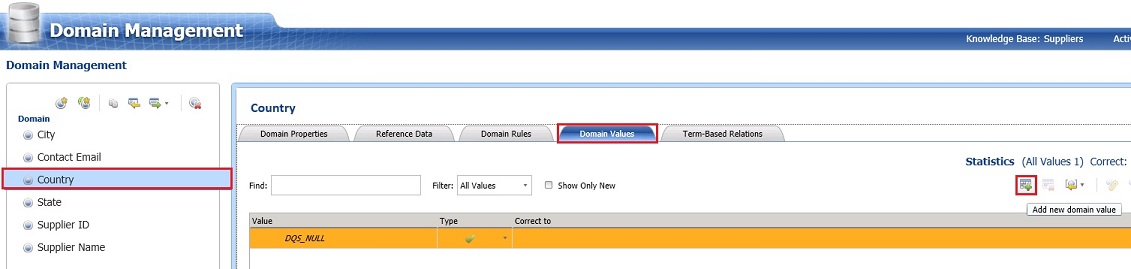
Click Country domain in the Domain list.
-
In the right pane, switch to the Domain Values tab.
-
Click Add new domain value button on the toolbar in the right pane.
-
Type United States for the Value field and press ENTER. You can see that, by default, the Type is set to Correct (green check). The Type can be set to Error (red cross) or Invalid (orange triangle), and a correct value can be entered in the Correct To field.


