Bot Insight dashboards
- Updated: 2026/05/19
Bot Insight dashboards
The Bot Insight dashboards provide dedicated graphical insight to help you view your bot information.
Dashboards display meaningful visuals and charts so that you can analyze, interpret, and take action on the updates that are important to you. You can use dynamically updated information about active users, failed tasks, apps, bots, bot schedules, workflows, queues, and the overall status of devices to create custom dashboards and widgets.
- From the Control Room, select .
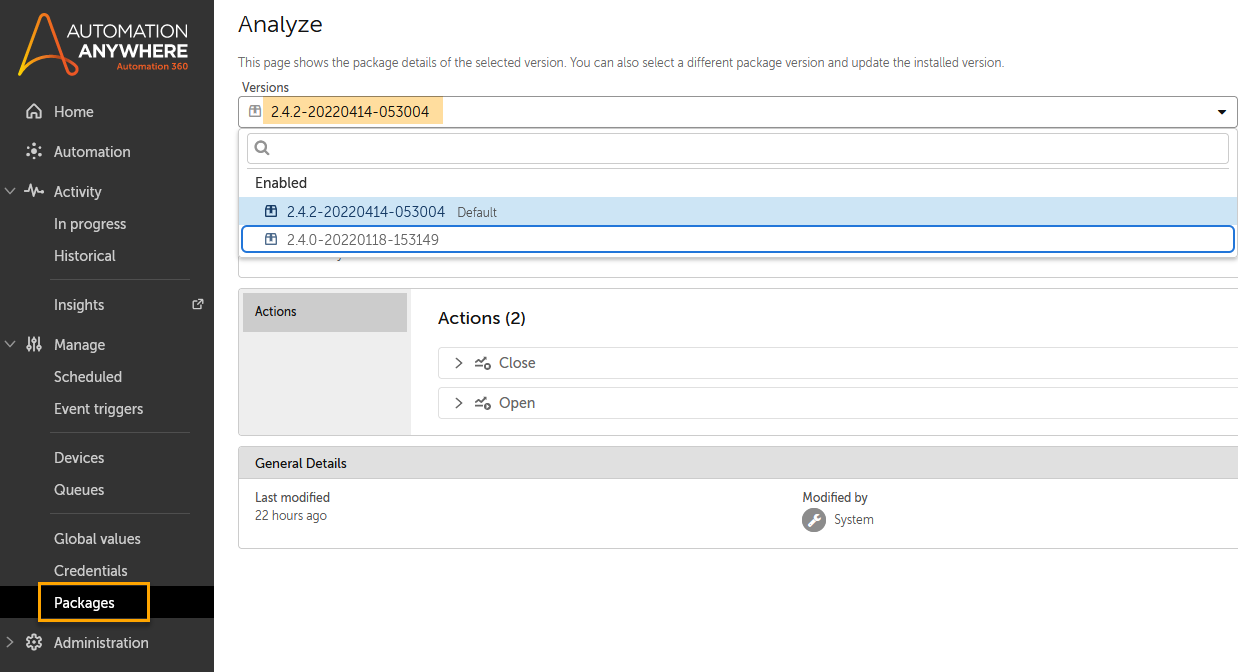
- Change the Analyze package version to 2.3.0-20210922-121532 or later.
- Save your changes.
- Run the bot and ensure the change to dashboard generation.
The Bot Insights dashboards might intermittently fail to load and display a Session timeout error message, even when users have the correct roles and permissions configured. This limitation is more likely to occur in scenarios where the user has access to a large number of folders and bots. In such cases, the dashboard request takes longer to aggregate and render the required data. If the load time exceeds the system’s session threshold, the request is terminated, resulting in a session timeout error.
As a result, the dashboards does not render, and users are unable to view analytics despite the underlying data being available and accessible.
- You must have either the
AAE_Bot Insight Adminor theAAE_Bot Insight Consumerrole assigned to you to view the published dashboard. - The data visible on the dashboards is in the UTC time zone.