---
title: "SQL Server Connector Maintenance & Troubleshooting | Microsoft Docs"
ms.custom: ""
ms.date: "04/05/2017"
ms.prod: "sql"
ms.prod_service: "database-engine"
ms.service: ""
ms.component: "security"
ms.reviewer: ""
ms.suite: "sql"
ms.technology:
- "database-engine"
ms.tgt_pltfrm: ""
ms.topic: "article"
helpviewer_keywords:
- "SQL Server Connector, appendix"
ms.assetid: 7f5b73fc-e699-49ac-a22d-f4adcfae62b1
caps.latest.revision: 21
author: "edmacauley"
ms.author: "edmaca"
manager: "craigg"
ms.workload: "Inactive"
---
# SQL Server Connector Maintenance & Troubleshooting
[!INCLUDE[appliesto-ss-xxxx-xxxx-xxx-md](../../../includes/appliesto-ss-xxxx-xxxx-xxx-md.md)]
Supplemental information about the [!INCLUDE[ssNoVersion](../../../includes/ssnoversion-md.md)] Connector is provided in this topic. For more information about the [!INCLUDE[ssNoVersion](../../../includes/ssnoversion-md.md)] connector, see [Extensible Key Management Using Azure Key Vault (SQL Server)](../../../relational-databases/security/encryption/extensible-key-management-using-azure-key-vault-sql-server.md), [Setup Steps for Extensible Key Management Using the Azure Key Vault](../../../relational-databases/security/encryption/setup-steps-for-extensible-key-management-using-the-azure-key-vault.md), and [Use SQL Server Connector with SQL Encryption Features](../../../relational-databases/security/encryption/use-sql-server-connector-with-sql-encryption-features.md).
## A. Maintenance Instructions for [!INCLUDE[ssNoVersion](../../../includes/ssnoversion-md.md)] Connector
### Key Rollover
> [!IMPORTANT]
> The [!INCLUDE[ssNoVersion](../../../includes/ssnoversion-md.md)] Connector requires the key name to only use the characters “a-z”, “A-Z”, “0-9”, and “-“, with a 26-character limit.
> Different key versions under the same key name in Azure Key Vault will not work with [!INCLUDE[ssNoVersion](../../../includes/ssnoversion-md.md)] Connector. To rotate an Azure Key Vault key that’s being used by [!INCLUDE[ssNoVersion](../../../includes/ssnoversion-md.md)], a new key with a new key name must be created.
Typically server asymmetric keys for [!INCLUDE[ssNoVersion](../../../includes/ssnoversion-md.md)] encryption need to be versioned every 1-2 years. It's important to note that although the Key Vault allows keys to be versioned, customers should not use that feature to implement versioning. The [!INCLUDE[ssNoVersion](../../../includes/ssnoversion-md.md)] Connector cannot deal with changes in Key Vault key version. To implement key versioning, the customer must create a new key in the Key Vault and then re-encrypt the data encryption key in [!INCLUDE[ssManStudio](../../../includes/ssmanstudio-md.md)].
For TDE, this is how this would be achieved:
- **In PowerShell:** Create a new asymmetric key (with a different name from your current TDE asymmetric key) in the Key Vault.
```powershell
Add-AzureRmKeyVaultKey -VaultName 'ContosoDevKeyVault' `
-Name 'Key2' -Destination 'Software'
```
- **Using [!INCLUDE[ssManStudio](../../../includes/ssmanstudio-md.md)] or sqlcmd.exe:** Use the following statements as shown in Step 3, section 3.
Import the new asymmetric key.
```sql
USE master
CREATE ASYMMETRIC KEY [MASTER_KEY2]
FROM PROVIDER [EKM]
WITH PROVIDER_KEY_NAME = 'Key2',
CREATION_DISPOSITION = OPEN_EXISTING
GO
```
Create a new login to be associated with the new asymmetric key (as shown under the TDE instructions).
```sql
USE master
CREATE LOGIN TDE_Login2
FROM ASYMMETRIC KEY [MASTER_KEY2]
GO
```
Create a new credential to be mapped to the login.
```sql
CREATE CREDENTIAL Azure_EKM_TDE_cred2
WITH IDENTITY = 'ContosoDevKeyVault',
SECRET = 'EF5C8E094D2A4A769998D93440D8115DAADsecret123456789=’
FOR CRYPTOGRAPHIC PROVIDER EKM;
ALTER LOGIN TDE_Login2
ADD CREDENTIAL Azure_EKM_TDE_cred2;
GO
```
Choose the database whose database encryption key you would like to re-encrypt.
```sql
USE [database]
GO
```
Re-encrypt the database encryption key.
```sql
ALTER DATABASE ENCRYPTION KEY
ENCRYPTION BY SERVER ASYMMETRIC KEY [MASTER_KEY2];
GO
```
### Upgrade of [!INCLUDE[ssNoVersion](../../../includes/ssnoversion-md.md)] Connector
Versions 1.0.0.440 and older have been replaced and are no longer supported in production environments. Versions 1.0.1.0 and newer are supported in production environments. Please use the following instructions to upgrade to the latest version available on the [Microsoft Download Center](https://www.microsoft.com/download/details.aspx?id=45344).
If you are currently using Version 1.0.1.0 or newer, follow these steps to update to the latest version of the [!INCLUDE[ssNoVersion](../../../includes/ssnoversion-md.md)] Connector. These instructions avoid the need to restart the [!INCLUDE[ssNoVersion](../../../includes/ssnoversion-md.md)] instance.
1. Install the newest version of the [!INCLUDE[ssNoVersion](../../../includes/ssnoversion-md.md)] Connector from the [Microsoft Download Center](https://www.microsoft.com/download/details.aspx?id=45344). In the installer wizard, save the new DLL file under a file path different from your original [!INCLUDE[ssNoVersion](../../../includes/ssnoversion-md.md)] Connector DLL's file path. For example, the new file path could be: `C:\Program Files\SQL Server Connector for Microsoft Azure Key Vault\\Microsoft.AzureKeyVaultService.EKM.dll`
2. In the instance of the [!INCLUDE[ssNoVersion](../../../includes/ssnoversion-md.md)], run the following Transact-SQL command to point your [!INCLUDE[ssNoVersion](../../../includes/ssnoversion-md.md)] instance to your new version of the [!INCLUDE[ssNoVersion](../../../includes/ssnoversion-md.md)] Connector:
```
ALTER CRYPTOGRAPHIC PROVIDER AzureKeyVault_EKM_Prov
FROM FILE =
'C:\Program Files\SQL Server Connector for Microsoft Azure Key Vault\\Microsoft.AzureKeyVaultService.EKM.dll'
GO
```
If you are currently using Version 1.0.0.440 or older, follow these steps to update to the latest version of the [!INCLUDE[ssNoVersion](../../../includes/ssnoversion-md.md)] Connector.
1. Stop the instance of [!INCLUDE[ssNoVersion](../../../includes/ssnoversion-md.md)].
2. Stop the [!INCLUDE[ssNoVersion](../../../includes/ssnoversion-md.md)] Connector service.
3. Uninstall the [!INCLUDE[ssNoVersion](../../../includes/ssnoversion-md.md)] Connector using the Windows Programs and Features feature.
(Alternatively, you can rename the folder that the DLL file is in. The default name of the folder is “[!INCLUDE[ssNoVersion](../../../includes/ssnoversion-md.md)] for Microsoft Azure Key Vault”.
4. Install the newest version of the [!INCLUDE[ssNoVersion](../../../includes/ssnoversion-md.md)] Connector from the Microsoft Download Center.
5. Restart the instance of [!INCLUDE[ssNoVersion](../../../includes/ssnoversion-md.md)].
6. Run the following statement to alter the EKM Provider to start using the newest version of the [!INCLUDE[ssNoVersion](../../../includes/ssnoversion-md.md)] Connector. Make sure that the file path is pointing to where you downloaded the newest version. (This step can be skipped if the new version is being installed in the same location as the original version.)
```sql
ALTER CRYPTOGRAPHIC PROVIDER AzureKeyVault_EKM_Prov
FROM FILE =
'C:\Program Files\SQL Server Connector for Microsoft Azure Key Vault\Microsoft.AzureKeyVaultService.EKM.dll';
GO
```
7. Check that the databases using TDE are accessible.
8. After validating that the update works, you may delete the old [!INCLUDE[ssNoVersion](../../../includes/ssnoversion-md.md)] Connector folder (if you chose to rename it instead of uninstalling in Step 3.)
### Rolling the [!INCLUDE[ssNoVersion](../../../includes/ssnoversion-md.md)] Service Principal
[!INCLUDE[ssNoVersion](../../../includes/ssnoversion-md.md)] uses Service Principals created in Azure Active Directory as credentials to access the Key Vault. Service Principal has a Client ID and Authentication Key. A [!INCLUDE[ssNoVersion](../../../includes/ssnoversion-md.md)] credential is set up with the **VaultName**, **Client ID**, and **Authentication Key**. The **Authentication Key** is valid for a certain period of time (1 or 2 years). Before the time period expires a new key must be generated in Azure AD for the Service Principal. Then the credential has to be changed in [!INCLUDE[ssNoVersion](../../../includes/ssnoversion-md.md)]. [!INCLUDE[ssManStudio](../../../includes/ssmanstudio-md.md)] maintains a cache for the credential in the current session, so when a credential is changed, [!INCLUDE[ssManStudio](../../../includes/ssmanstudio-md.md)] should be restarted.
### Key Backup and Recovery
The Key vault should be regularly backed up. If an asymmetric key in the vault is lost, it can be restored from backup. The key must be restored using the same name as before, which the Restore PowerShell command will do (see below steps).
If the vault has been lost, you will need to recreate a vault and restore the asymmetric key to the vault using the same name as before. The vault name can be different (or the same as before). You must also set the access permissions on the new vault to grant to the SQL Server service principal the access that is needed for the SQL Server encryption scenarios and then adjust the SQL Server credential so that the new vault name is reflected.
In summary, here are the steps:
* Backup the vault key (using the Backup-AzureKeyVaultKey Powershell cmdlet).
* In the case of vault failure, create a new vault in the same geographic region*. The user creating this should be in the same default directory as the service principal setup for SQL Server.
* Restore the key to the new vault (using the Restore-AzureKeyVaultKey Powershell cmdlet – this restores the key using the same name as before). If there is already a key with the same name, the restore will fail.
* Grant permissions to the SQL Server service principal to use this new vault.
* Modify the SQL Server credential used by the Database Engine to reflect the new vault name (if needed).
Key backups can be restored across Azure regions, as long as they remain in the same geographic region or national cloud: USA, Canada, Japan, Australia, India, APAC, Europe Brazil, China, US Government, or Germany.
## B. Frequently Asked Questions
### On Azure Key Vault
**How do key operations work with Azure Key Vault?**
The asymmetric key in the key vault is used to protect [!INCLUDE[ssNoVersion](../../../includes/ssnoversion-md.md)] encryption keys. Only the public portion of the asymmetric key ever leaves the vault; the private portion is never exported by the vault. All cryptographic operations using the asymmetric key are done within the Azure Key Vault service, and are protected by the service’s security.
**What is a Key URI?**
Every key in Azure Key Vault has a Uniform Resource Identifier (URI), which you can use to reference the key in your application. Use the format `https://ContosoKeyVault.vault.azure.net/keys/ContosoFirstKey` to get the current version, and use the format `https://ContosoKeyVault.vault.azure.net/keys/ContosoFirstKey/cgacf4f763ar42ffb0a1gca546aygd87` to get a specific version.
### On Configuring [!INCLUDE[ssNoVersion](../../../includes/ssnoversion-md.md)]
**What are the endpoints that the SQL Server Connector needs access to?**
The Connector talks to two endpoints, which need to be whitelisted. The only port required for outbound communication to these other services is 443 for Https:
- login.microsoftonline.com/*:443
- *.vault.azure.net/*:443
**What are the minimum permission levels required for each configuration step in [!INCLUDE[ssNoVersion](../../../includes/ssnoversion-md.md)]?**
Though you could perform all the configuration steps as a member of the sysadmin fixed server role, [!INCLUDE[msCoName](../../../includes/msconame-md.md)] encourages you to minimize the permissions you use. The following list defines the minimum permission level for each action.
- To create a cryptographic provider, requires `CONTROL SERVER` permission or membership in the **sysadmin** fixed server role.
- To change a configuration option and run the `RECONFIGURE` statement, you must be granted the `ALTER SETTINGS` server-level permission. The `ALTER SETTINGS` permission is implicitly held by the sysadmin and **serveradmin** fixed server roles.
- To create a credential, requires `ALTER ANY CREDENTIAL` permission.
- To add a credential to a login, requires `ALTER ANY LOGIN` permission.
- To create an asymmetric key, requires `CREATE ASYMMETRIC KEY` permission.
**How do I change my default Active Directory so my key vault is created in the same subscription and Active Directory as the service principal I created for the [!INCLUDE[ssNoVersion_md](../../../includes/ssnoversion-md.md)] Connector?**
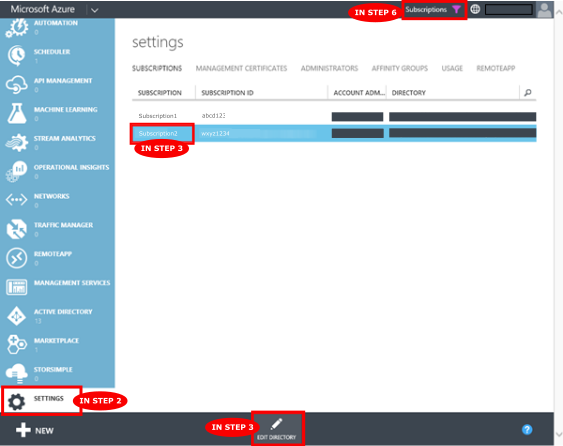
1. Go to the Azure classic portal: [https://manage.windowsazure.com](https://manage.windowsazure.com)
2. On the left-hand menu, scroll down and select **Settings**.
3. Select the Azure subscription you are currently using, and click **Edit Directory** from the commands at the bottom of the screen.
4. In the pop-up window, use the **Directory** dropdown to select the Active Directory you'd like to use. This will make it the default Directory.
5. Make sure you are the global admin of the newly selected Active Directory. If you are not the global admin, so might lose management permissions because you switched directories.
6. Once the pop-up window closes, if you don't see any of your subscriptions, you may need to update the **Filter by Directory** filter in the **Subscriptions** filter in the top right hand menu of the screen to see subscriptions using your newly updated Active Directory.
> [!NOTE]
> You may not have permissions to actually change the default directory on your Azure subscription. In this case, create the AAD service principal within your default directory so that it is in the same directory as the Azure Key Vault used later.
To learn more about Active Directory, read [How Azure subscription are related to Azure Active Directory](https://azure.microsoft.com/documentation/articles/active-directory-how-subscriptions-associated-directory/)
## C. Error Code Explanations for [!INCLUDE[ssNoVersion](../../../includes/ssnoversion-md.md)] Connector
**Provider Error Codes:**
Error code |Symbol |Description
---------|---------|---------
0 | scp_err_Success | The operation has succeeded.
1 | scp_err_Failure | The operation has failed.
2 | scp_err_InsufficientBuffer | This error tells engine to allocate more memory for the buffer.
3 | scp_err_NotSupported | The operation is not supported. E.g., the key type or algorithm specified is not supported by the EKM provider.
4 | scp_err_NotFound | The specified key or algorithm could not be found by the EKM provider.
5 | scp_err_AuthFailure | The authentication has failed with EKM provider.
6 | scp_err_InvalidArgument | The provided argument is invalid.
7 | scp_err_ProviderError | There is an unspecified error happened in EKM provider that is caught by SQL engine.
2049 | scp_err_KeyNameDoesNotFitThumbprint | The key name is too long to fit into SQL engine’s thumbprint. The key name must not exceed 26 characters.
2050 | scp_err_PasswordTooShort | The secret string which is the concatenation of AAD client id and secret is shorter than 32 characters.
2051 | scp_err_OutOfMemory | SQL engine has run out of memory and failed to allocate memory for EKM provider.
2052 | scp_err_ConvertKeyNameToThumbprint | Failed to convert key name to thumbprint.
2053 | scp_err_ConvertThumbprintToKeyName| Failed to convert thumbprint to key name.
3000 | ErrorSuccess | The AKV operation has succeeded.
3001 | ErrorUnknown | The AKV operation has failed with an unspecified error.
3002 | ErrorHttpCreateHttpClientOutOfMemory | Cannot create a HttpClient for AKV operation due to out of memory.
3003 | ErrorHttpOpenSession | Cannot open a Http session due to network error.
3004 | ErrorHttpConnectSession | Cannot connect a Http session due to network error.
3005 | ErrorHttpAttemptConnect | Cannot attempt a connect due to network error.
3006 | ErrorHttpOpenRequest | Cannot open a request due to network error.
3007 | ErrorHttpAddRequestHeader | Cannot add request header.
3008 | ErrorHttpSendRequest | Cannot send a request due to network error.
3009 | ErrorHttpGetResponseCode | Cannot get a response code due to network error.
3010 | ErrorHttpResponseCodeUnauthorized | Server responded 401 for the request.
3011 | ErrorHttpResponseCodeThrottled | Server has throttled the request.
3012 | ErrorHttpResponseCodeClientError | The request sent from the connector is invalid. This usually means the key name is invalid or contains invalid characters.
3013 | ErrorHttpResponseCodeServerError | Server responded a response code between 500 and 600.
3014 | ErrorHttpQueryHeader | Cannot query for response header.
3015 | ErrorHttpQueryHeaderOutOfMemoryCopyHeader | Cannot copy the response header due to out of memory.
3016 | ErrorHttpQueryHeaderOutOfMemoryReallocBuffer | Cannot query the response header due to out of memory when reallocating a buffer.
3017 | ErrorHttpQueryHeaderNotFound | Cannot find the query header in the response.
3018 | ErrorHttpQueryHeaderUpdateBufferLength | Cannot update the buffer length when querying the response header.
3019 | ErrorHttpReadData | Cannot read response data due to network error.
3076 | ErrorHttpResourceNotFound | The server responded 404, because the key name was not found. Please make sure the key name exists in your vault.
3077 | ErrorHttpOperationForbidden | The server responded 403, because the user doesn’t have proper permission to perform the action. Please make sure you have the permission for the specified operation. At minimum, the connector requires 'get, list, wrapKey, unwrapKey' permissions to function properly.
If you don’t see your error code in this table, here are some other reasons the error may be happening:
- You may not have Internet access and cannot access your Azure Key Vault – please check your Internet connection.
- The Azure Key Vault service may be down. Please try again at another time.
- You may have dropped the asymmetric key from Azure Key Vault or [!INCLUDE[ssNoVersion](../../../includes/ssnoversion-md.md)]. Please restore the key.
- If you receive a “Cannot load library” error, make sure you have the appropriate version of the Visual Studio C++ redistributable installed based on the version of SQL Server that you are running. The table below specifies which version to install from the Microsoft Download Center.
SQL Server Version |Redistributable Install Link
---------|---------
2008, 2008 R2, 2012, 2014 | [Visual C++ Redistributable Packages for Visual Studio 2013](https://www.microsoft.com/download/details.aspx?id=40784)
2016 | [Visual C++ Redistributable for Visual Studio 2015](https://www.microsoft.com/download/details.aspx?id=48145)
## Additional References
More About Extensible Key Management:
- [Extensible Key Management (EKM)](../../../relational-databases/security/encryption/extensible-key-management-ekm.md)
SQL Encryptions supporting EKM:
- [Enable TDE on SQL Server Using EKM](../../../relational-databases/security/encryption/enable-tde-on-sql-server-using-ekm.md)
- [Backup Encryption](../../../relational-databases/backup-restore/backup-encryption.md)
- [Create an Encrypted Backup](../../../relational-databases/backup-restore/create-an-encrypted-backup.md)
Related [!INCLUDE[tsql](../../../includes/tsql-md.md)] Commands:
- [sp_configure (Transact-SQL)](../../../relational-databases/system-stored-procedures/sp-configure-transact-sql.md)
- [CREATE CRYPTOGRAPHIC PROVIDER (Transact-SQL)](../../../t-sql/statements/create-cryptographic-provider-transact-sql.md)
- [CREATE CREDENTIAL (Transact-SQL)](../../../t-sql/statements/create-credential-transact-sql.md)
- [CREATE ASYMMETRIC KEY (Transact-SQL)](../../../t-sql/statements/create-asymmetric-key-transact-sql.md)
- [CREATE SYMMETRIC KEY (Transact-SQL)](../../../t-sql/statements/create-symmetric-key-transact-sql.md)
- [CREATE LOGIN (Transact-SQL)](../../../t-sql/statements/create-login-transact-sql.md)
- [ALTER LOGIN (Transact-SQL)](../../../t-sql/statements/alter-login-transact-sql.md)
Azure Key Vault documentation:
- [What is Azure Key Vault?](https://azure.microsoft.com/documentation/articles/key-vault-whatis/)
- [Get Started with Azure Key Vault](https://azure.microsoft.com/documentation/articles/key-vault-get-started/)
- PowerShell [Azure Key Vault Cmdlets](https://msdn.microsoft.com/library/dn868052.aspx) reference
## See Also
[Extensible Key Management Using Azure Key Vault](../../../relational-databases/security/encryption/extensible-key-management-using-azure-key-vault-sql-server.md) [Use SQL Server Connector with SQL Encryption Features](../../../relational-databases/security/encryption/use-sql-server-connector-with-sql-encryption-features.md)
[EKM provider enabled Server Configuration Option](../../../database-engine/configure-windows/ekm-provider-enabled-server-configuration-option.md)
[Setup Steps for Extensible Key Management Using the Azure Key Vault](../../../relational-databases/security/encryption/setup-steps-for-extensible-key-management-using-the-azure-key-vault.md)