---
title: Query external data in Oracle
titleSuffix: SQL Server Big Data Clusters
description: This tutorial demonstrates how to query Oracle data from a SQL Server 2019 big data cluster. You create an external table over data in Oracle and then run a query.
author: WilliamDAssafMSFT
ms.author: wiassaf
ms.reviewer: dacoelho
ms.date: 10/01/2020
ms.topic: tutorial
ms.prod: sql
ms.technology: big-data-cluster
---
# Tutorial: Query Oracle from SQL Server Big Data Cluster
[!INCLUDE[SQL Server 2019](../includes/applies-to-version/sqlserver2019.md)]
This tutorial demonstrates how to Query Oracle data from a SQL Server 2019 big data cluster. To run this tutorial, you will need to have access to an Oracle server. An Oracle user account with read privileges to the external object is required. Oracle Proxy user authentication is supported. If you do not have access, this tutorial can give you a sense of how data virtualization works for external data sources in SQL Server big data cluster.
In this tutorial, you learn how to:
> [!div class="checklist"]
> * Create an external table for data in an external Oracle database.
> * Join this data with high-value data in the master instance.
> [!TIP]
> If you prefer, you can download and run a script for the commands in this tutorial. For instructions, see the [Data virtualization samples](https://github.com/Microsoft/sql-server-samples/tree/master/samples/features/sql-big-data-cluster/data-virtualization) on GitHub.
## Prerequisites
- [Big data tools](deploy-big-data-tools.md)
- **kubectl**
- **Azure Data Studio**
- **SQL Server 2019 extension**
- [Load sample data into your big data cluster](tutorial-load-sample-data.md)
## Create an Oracle table
The following steps create a sample table named `INVENTORY` in Oracle.
1. Connect to an Oracle instance and database that you want to use for this tutorial.
1. Run the following statement to create the `INVENTORY` table:
```sql
CREATE TABLE "INVENTORY"
(
"INV_DATE" NUMBER(10,0) NOT NULL,
"INV_ITEM" NUMBER(10,0) NOT NULL,
"INV_WAREHOUSE" NUMBER(10,0) NOT NULL,
"INV_QUANTITY_ON_HAND" NUMBER(10,0)
);
CREATE INDEX INV_ITEM ON HR.INVENTORY(INV_ITEM);
```
1. Import the contents of the **inventory.csv** file into this table. This file was created by the sample creation scripts in the [Prerequisites](#prereqs) section.
## Create an external data source
The first step is to create an external data source that can access your Oracle server.
1. In Azure Data Studio, connect to the SQL Server master instance of your big data cluster. For more information, see [Connect to the SQL Server master instance](connect-to-big-data-cluster.md#master).
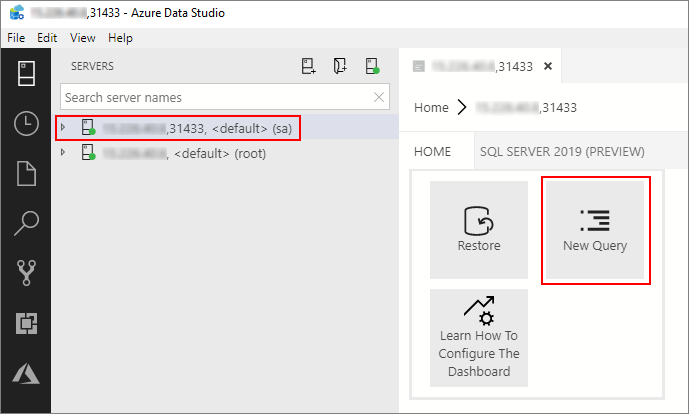
1. Double-click on the connection in the **Servers** window to show the server dashboard for the SQL Server master instance. Select **New Query**.
1. Run the following Transact-SQL command to change the context to the **Sales** database in the master instance.
```sql
USE Sales
GO
```
1. Create a database scoped credential to connect to the Oracle server. Provide appropriate credentials to your Oracle server in the following statement.
```sql
CREATE DATABASE SCOPED CREDENTIAL [OracleCredential]
WITH IDENTITY = '', SECRET = '';
```
1. Create an external data source that points to the Oracle server.
```sql
CREATE EXTERNAL DATA SOURCE [OracleSalesSrvr]
WITH (LOCATION = 'oracle://',CREDENTIAL = [OracleCredential]);
```
### Optional: Oracle proxy authentication
Oracle supports proxy authentication to provide fine grain access control. A proxy user connects to the Oracle database using its credentials and impersonates another user in the database.
A proxy user can be configured to have limited access compared to the user being impersonated. For example, a proxy user can be allowed to connect using a specific database role of the user being impersonated. The identity of the user connecting to Oracle database through proxy user is preserved in the connection, even if multiple users are connecting using proxy authentication. This enables Oracle to enforce access control and to audit actions taken on behalf of the actual user.
If your scenario requires the usage of an oracle proxy user, __replace the previous steps 4 and 5 with the following__.
4. Create a database scoped credential to connect to the Oracle server. Provide appropriate oracle proxy user credentials to your Oracle server in the following statement.
```sql
CREATE DATABASE SCOPED CREDENTIAL [OracleProxyCredential]
WITH IDENTITY = '', SECRET = '';
```
5. Create an external data source that points to the Oracle server.
```sql
CREATE EXTERNAL DATA SOURCE [OracleSalesSrvr]
WITH (LOCATION = 'oracle://',
CONNECTION_OPTIONS = 'ImpersonateUser=%CURRENT_USER',
CREDENTIAL = [OracleProxyCredential]);
```
## Create an external table
Next, create an external table named **iventory_ora** over the `INVENTORY` table on the Oracle server.
```sql
CREATE EXTERNAL TABLE [inventory_ora]
([inv_date] DECIMAL(10,0) NOT NULL, [inv_item] DECIMAL(10,0) NOT NULL,
[inv_warehouse] DECIMAL(10,0) NOT NULL, [inv_quantity_on_hand] DECIMAL(10,0))
WITH (DATA_SOURCE=[OracleSalesSrvr],
LOCATION='..');
```
> [!NOTE]
> Table names and column names will use ANSI SQL quoted identifier while querying against Oracle. As a result, the names are case-sensitive. It is important to specify the name in the external table definition that matches the exact case of the table and column names in the Oracle metadata.
## Query the data
Run the following query to join the data in the `iventory_ora` external table with the tables in the local `Sales` database.
```sql
SELECT TOP(100) w.w_warehouse_name, i.inv_item, SUM(i.inv_quantity_on_hand) as total_quantity
FROM [inventory_ora] as i
JOIN item as it
ON it.i_item_sk = i.inv_item
JOIN warehouse as w
ON w.w_warehouse_sk = i.inv_warehouse
WHERE it.i_category = 'Books' and i.inv_item BETWEEN 1 and 18000 --> get items within specific range
GROUP BY w.w_warehouse_name, i.inv_item;
```
## Clean up
Use the following command to remove the database objects created in this tutorial.
```sql
DROP EXTERNAL TABLE [inventory_ora];
DROP EXTERNAL DATA SOURCE [OracleSalesSrvr] ;
DROP DATABASE SCOPED CREDENTIAL [OracleCredential];
```
## Next steps
Learn how to ingest data into the data pool:
> [!div class="nextstepaction"]
> [Load data into the data pool](tutorial-data-pool-ingest-sql.md)