| title | Ingest data into a SQL Server data pool |
|---|---|
| titleSuffix | SQL Server big data clusters |
| description | This tutorial demonstrates how to ingest data into the data pool of a [!INCLUDE[big-data-clusters-2019](../includes/ssbigdataclusters-ver15.md)]. |
| author | MikeRayMSFT |
| ms.author | mikeray |
| ms.reviewer | mihaelab |
| ms.date | 08/21/2019 |
| ms.topic | tutorial |
| ms.prod | sql |
| ms.technology | big-data-cluster |
[!INCLUDEtsql-appliesto-ssver15-xxxx-xxxx-xxx]
This tutorial demonstrates how to use Transact-SQL to load data into the data pool of a [!INCLUDEbig-data-clusters-2019]. With [!INCLUDEbig-data-clusters-2019], data from a variety of sources can be ingested and distributed across data pool instances.
In this tutorial, you learn how to:
[!div class="checklist"]
- Create an external table in the data pool.
- Insert sample web clickstream data into the data pool table.
- Join data in the data pool table with local tables.
Tip
If you prefer, you can download and run a script for the commands in this tutorial. For instructions, see the Data pools samples on GitHub.
- Big data tools
- kubectl
- Azure Data Studio
- SQL Server 2019 extension
- Load sample data into your big data cluster
The following steps create an external table in the data pool named web_clickstream_clicks_data_pool. This table can then be used as a location for ingesting data into the big data cluster.
-
In Azure Data Studio, connect to the SQL Server master instance of your big data cluster. For more information, see Connect to the SQL Server master instance.
-
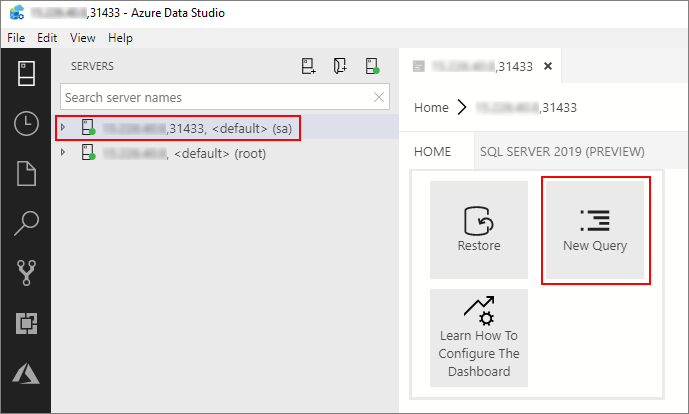
Double-click on the connection in the Servers window to show the server dashboard for the SQL Server master instance. Select New Query.
-
Run the following Transact-SQL command to change the context to the Sales database in the master instance.
USE Sales
GO
-
Create an external data source to the data pool if it does not already exist.
IF NOT EXISTS(SELECT * FROM sys.external_data_sources WHERE name = 'SqlDataPool')
  CREATE EXTERNAL DATA SOURCE SqlDataPool
  WITH (LOCATION = 'sqldatapool://controller-svc/default');
-
Create an external table named web_clickstream_clicks_data_pool in the data pool.
IF NOT EXISTS(SELECT * FROM sys.external_tables WHERE name = 'web_clickstream_clicks_data_pool')
   CREATE EXTERNAL TABLE [web_clickstream_clicks_data_pool]
   ("wcs_user_sk" BIGINT , "i_category_id" BIGINT , "clicks" BIGINT)
   WITH
   (
      DATA_SOURCE = SqlDataPool,
      DISTRIBUTION = ROUND_ROBIN
   );

The following steps ingest sample web clickstream data into the data pool using the external table created in the previous steps.
-
Use an
INSERT INTOstatement to insert the results from the query into the data pool (the web_clickstream_clicks_data_pool external table).INSERT INTO web_clickstream_clicks_data_pool SELECT wcs_user_sk, i_category_id, COUNT_BIG(*) as clicks FROM sales.dbo.web_clickstreams_hdfs INNER JOIN sales.dbo.item it ON (wcs_item_sk = i_item_sk AND wcs_user_sk IS NOT NULL) GROUP BY wcs_user_sk, i_category_id HAVING COUNT_BIG(*) > 100;
-
Inspect the inserted data with two SELECT queries.
SELECT count(*) FROM [dbo].[web_clickstream_clicks_data_pool]
SELECT TOP 10 * FROM [dbo].[web_clickstream_clicks_data_pool]
Join the stored results from the query in the data pool with local data in the Sales table.
SELECT TOP (100)
   w.wcs_user_sk,
   SUM( CASE WHEN i.i_category = 'Books' THEN 1 ELSE 0 END) AS book_category_clicks,
   SUM( CASE WHEN w.i_category_id = 1 THEN 1 ELSE 0 END) AS [Home & Kitchen],
   SUM( CASE WHEN w.i_category_id = 2 THEN 1 ELSE 0 END) AS [Music],
   SUM( CASE WHEN w.i_category_id = 3 THEN 1 ELSE 0 END) AS [Books],
   SUM( CASE WHEN w.i_category_id = 4 THEN 1 ELSE 0 END) AS [Clothing & Accessories],
   SUM( CASE WHEN w.i_category_id = 5 THEN 1 ELSE 0 END) AS [Electronics],
   SUM( CASE WHEN w.i_category_id = 6 THEN 1 ELSE 0 END) AS [Tools & Home Improvement],
   SUM( CASE WHEN w.i_category_id = 7 THEN 1 ELSE 0 END) AS [Toys & Games],
   SUM( CASE WHEN w.i_category_id = 8 THEN 1 ELSE 0 END) AS [Movies & TV],
   SUM( CASE WHEN w.i_category_id = 9 THEN 1 ELSE 0 END) AS [Sports & Outdoors]
FROM [dbo].[web_clickstream_clicks_data_pool] as w
INNER JOIN (SELECT DISTINCT i_category_id, i_category FROM item) as i
   ON i.i_category_id = w.i_category_id
GROUP BY w.wcs_user_sk;Use the following command to remove the database objects created in this tutorial.
DROP EXTERNAL TABLE [dbo].[web_clickstream_clicks_data_pool];Learn about how to ingest data into the data pool with Spark jobs:
[!div class="nextstepaction"] Ingest data with Spark jobs