| title | Step 2: Import Data to SQL Server using PowerShell | Microsoft Docs | ||
|---|---|---|---|
| ms.custom | |||
| ms.date | 05/25/2017 | ||
| ms.prod | sql-server-vnext-ctp2 | ||
| ms.reviewer | |||
| ms.suite | |||
| ms.technology |
|
||
| ms.tgt_pltfrm | |||
| ms.topic | article | ||
| applies_to |
|
||
| dev_langs |
|
||
| ms.assetid | |||
| caps.latest.revision | 2 | ||
| author | jeannt | ||
| ms.author | jeannt | ||
| manager | jhubbard |
In this step, you'll run one of the downloaded scripts to create the database objects required for the walkthrough. The script also creates most of the stored procedures you'll use, and uploads the sample data to a table in the database you specified.
Among the downloaded files you should see a PowerShell script. You must run this script to prepare the environment for the walkthrough. The script performs these actions:
-
Installs the SQL Native Client and SQL command-line utilities, if not already installed. These utilities are required for bulk-loading the data to the database using bcp.
-
Creates a database and a table on the [!INCLUDEssNoVersion] instance, and bulk-inserts data into the table
-
Creates multiple SQL functions and stored procedures
-
Open a PowerShell command prompt as administrator and run the following command.
.\RunSQL_SQL_Walkthrough.ps1You will be prompted to input the following information:
- The name or address of a [!INCLUDEssCurrent] instance where machine learning Services with Python has been installed
- The user name and password for an account on the instance. The account you use must have the ability to create databases, create tables and stored procedures, and upload data to tables. If you do not provide the user name and password, your Windows identity will be used to sign in to SQL Server.
- The path and file name of the sample data file that you just downloaded. For example,
C:\tempPythonSQL\nyctaxi1pct.csv
Note
This operation requires that xmlrw.dll and bcp.exe be in the same folder. If not, make a copy of xmlrw.dll.
-
As part of this step, all the [!INCLUDEtsql] scripts are also modified to replace placeholders with the database name and user name that you provide as script inputs.
The following table lists the stored procedures and functions created by the script.
SQL script file name Function create-db-tb-upload-data.sql Creates a database and two tables:
nyctaxi_sample: Contains the main NYC Taxi dataset. A clustered columnstore index is added to the table to improve storage and query performance. The 1% sample of the NYC Taxi dataset will be inserted into this table.
nyc_taxi_models: Used to persist the trained advanced analytics model.fnCalculateDistance.sql Creates a scalar-valued function that calculates the direct distance between pickup and dropoff locations fnEngineerFeatures.sql Creates a table-valued function that creates new data features for model training PersistModel.sql Creates a stored procedure that can be called to save a model. The stored procedure takes a model that has been serialized in a varbinary data type, and writes it to the specified table. PredictTipSciKitPy.sql Creates a stored procedure that calls the trained model to create predictions using the model. The stored procedure accepts a query as its input parameter and returns a column of numeric values containing the scores for the input rows. PredictTipSingleModeSciKitPy.sql Creates a stored procedure that calls the trained model to create predictions using the model. This stored procedure accepts a new observation as input, with individual feature values passed as in-line parameters, and returns a value that predicts the outcome for the new observation. You'll create some additional stored procedures in the latter part of this walkthrough:
SQL script file name Function SerializePlots.sql Creates a stored procedure for data exploration. This stored procedure creates a graphic using Python and then serialize the graph objects. TrainTipPredictionModelSciKitPy.sql Creates a stored procedure that trains a logistic regression model. The model predicts the value of the tipped column, and is trained using a randomly selected 70% of the data. The output of the stored procedure is the trained model, which is saved in the table nyc_taxi_models. -
Log in to the [!INCLUDEssNoVersion] instance using [!INCLUDEssManStudioFull] and the login you specified, to verify that you can see the database, tables, functions, and stored procedures that were created.
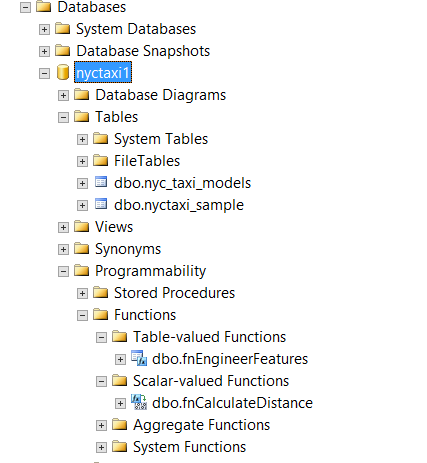
[!NOTE] If the database objects already exist, they cannot be created again. If the table already exists, the data will be appended, not overwritten. Therefore, be sure to drop any existing objects before running the script.
-
At this point, you have run only PowerShell and T-SQL commands. Before going any further, you might wish to check that external scripting languages are supported on the SQL Server instance. After installing the Python machine learning feature, it is not enabled by default, so you might need to enable the feature, create a firewall rule, add the Python worker group to SQL Server security, or set up database permissions. See these instructions.

Step 3: Explore and Visualize the Data