| title | SQL Data Discovery & Classification | Microsoft Docs |
|---|---|
| description | SQL Data Discovery & Classification |
| documentationcenter | |
| ms.reviewer | vanto |
| ms.assetid | 89c2a155-c2fb-4b67-bc19-9b4e03c6d3bc |
| ms.service | sql-database |
| ms.prod_service | sql-database,sql |
| ms.custom | security |
| ms.topic | conceptual |
| ms.date | 09/12/2019 |
| ms.author | mibar |
| author | barmichal |
[!INCLUDEappliesto-ss-xxxx-xxxx-xxx-md]
Data Discovery & Classification introduces a new tool built into SQL Server Management Studio (SSMS) for discovering, classifying, labeling & reporting the sensitive data in your databases. Discovering and classifying your most sensitive data (business, financial, healthcare, etc.) can play a pivotal role in your organizational information protection stature. It can serve as infrastructure for:
- Helping meet data privacy standards.
- Controlling access to and hardening the security of databases/columns containing highly sensitive data.
Note
Data Discovery & Classification is supported for SQL Server 2012 and later, and can be used with SSMS 17.5 or later. For Azure SQL Database, see Azure SQL Database Data Discovery & Classification.
Data Discovery & Classification introduces a set of advanced services, forming a new SQL Information Protection paradigm aimed at protecting the data, not just the database:
- Discovery & recommendations - The classification engine scans your database and identifies columns containing potentially sensitive data. It then provides you an easy way to review and apply the appropriate classification recommendations, as well as to manually classify columns.
- Labeling - Sensitivity classification labels can be persistently tagged on columns.
- Visibility - The database classification state can be viewed in a detailed report that can be printed/exported to be used for compliance & auditing purposes, as well as other needs.
The following section describes the steps for discovering, classifying, and labeling columns containing sensitive data in your database, as well as viewing the current classification state of your database and exporting reports.
The classification includes two metadata attributes:
- Labels - The main classification attributes, used to define the sensitivity level of the data stored in the column.
- Information Types - Provide additional granularity into the type of data stored in the column.
To classify your SQL Server database:
-
In SQL Server Management Studio (SSMS) connect to the SQL Server.
-
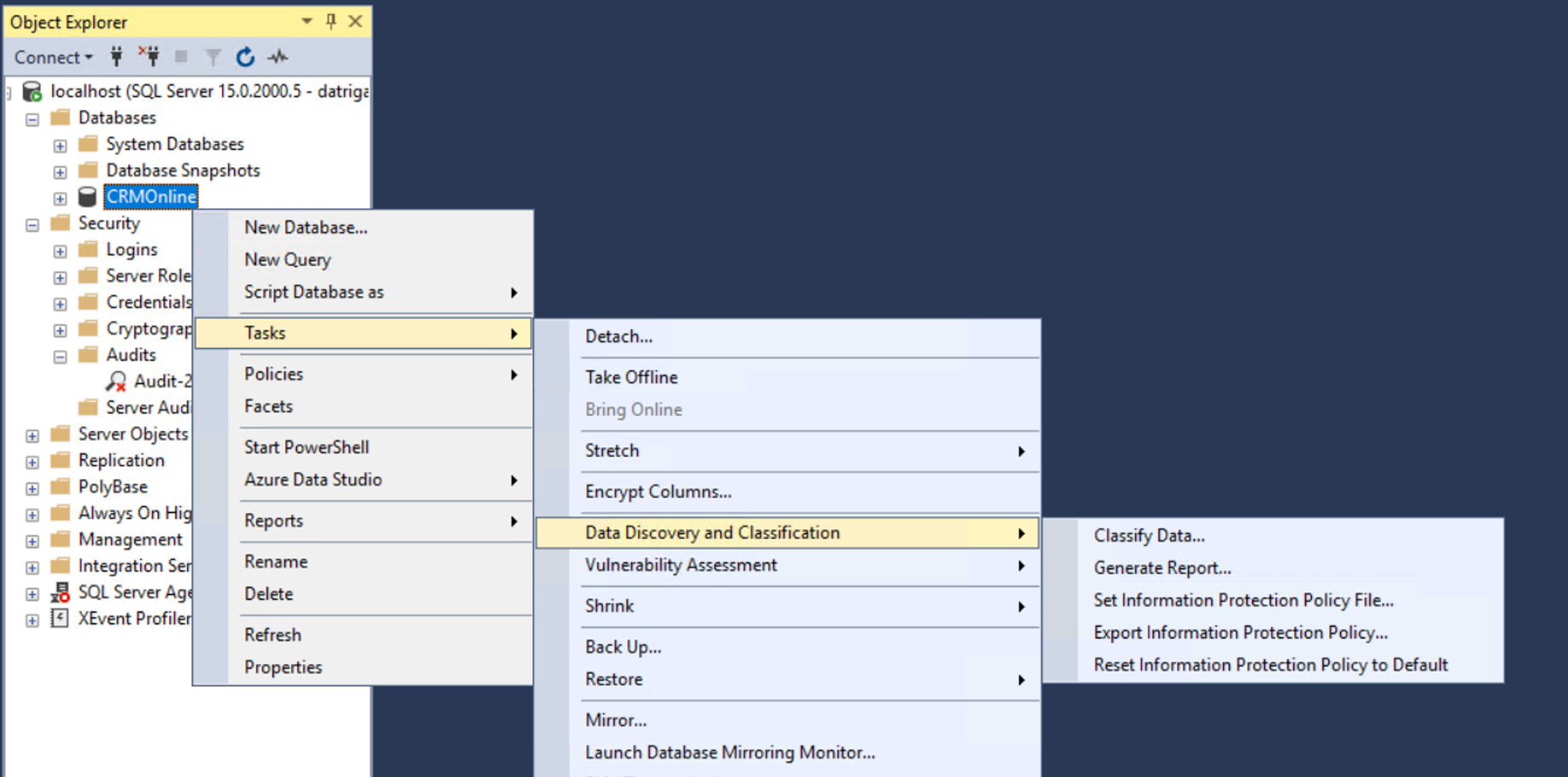
In the SSMS Object Explorer, right click on the database that you would like to classify and choose Tasks > Data Discovery and Classification > Classify Data....
-
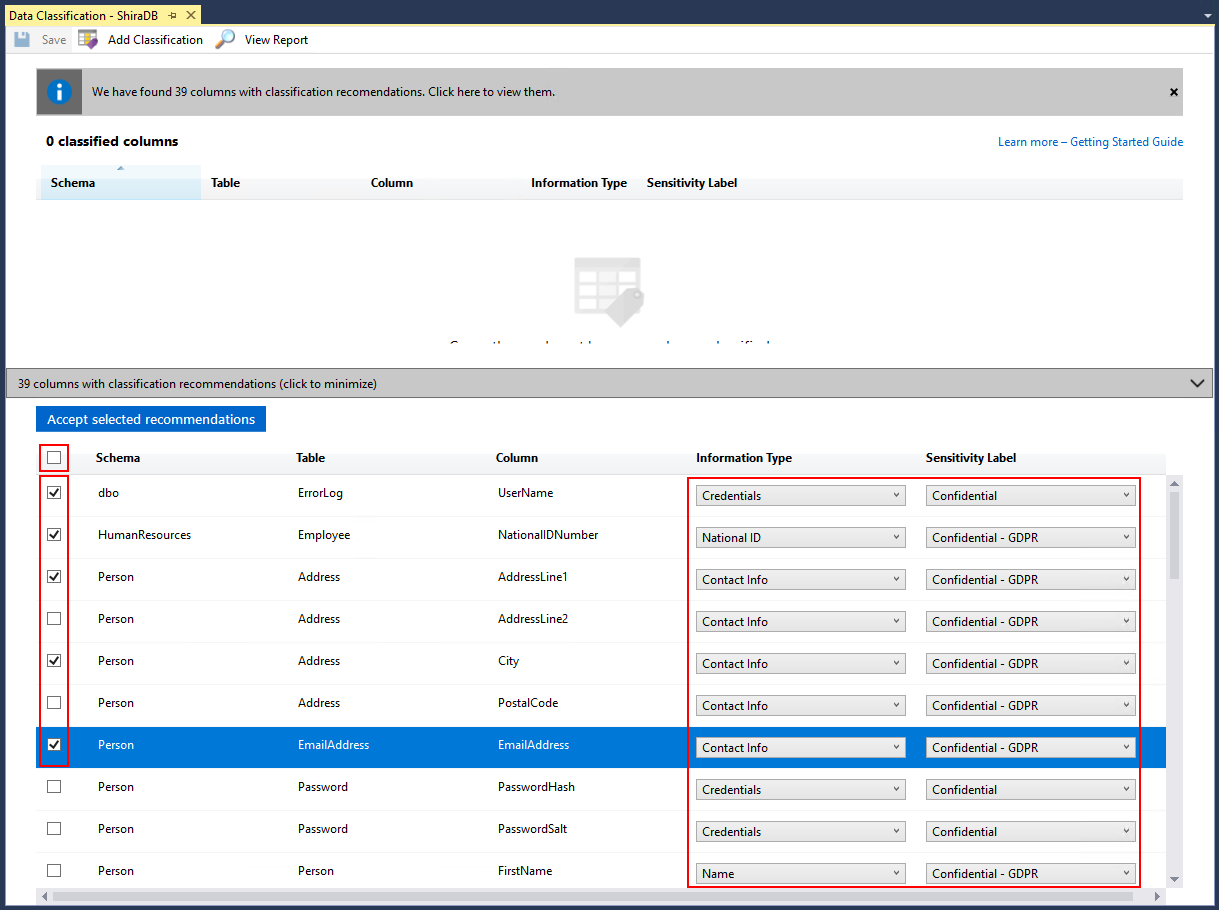
The classification engine scans your database for columns containing potentially sensitive data and provides a list of recommended column classifications:
-
To view the list of recommended column classifications, click on the recommendations notification box at the top or the recommendations panel at the bottom of the window:


-
Review the list of recommendations:
-
To accept a recommendation for a specific column, check the checkbox in the left column of the relevant row. You can also mark all recommendations as accepted by checking the checkbox in the recommendations table header.
-
You can also change the recommended Information Type and Sensitivity Label using the drop down boxes.
-
-
To apply the selected recommendations, click on the blue Accept selected recommendations button.

-
-
You can also manually classify columns as an alternative, or in addition, to the recommendation-based classification:
-
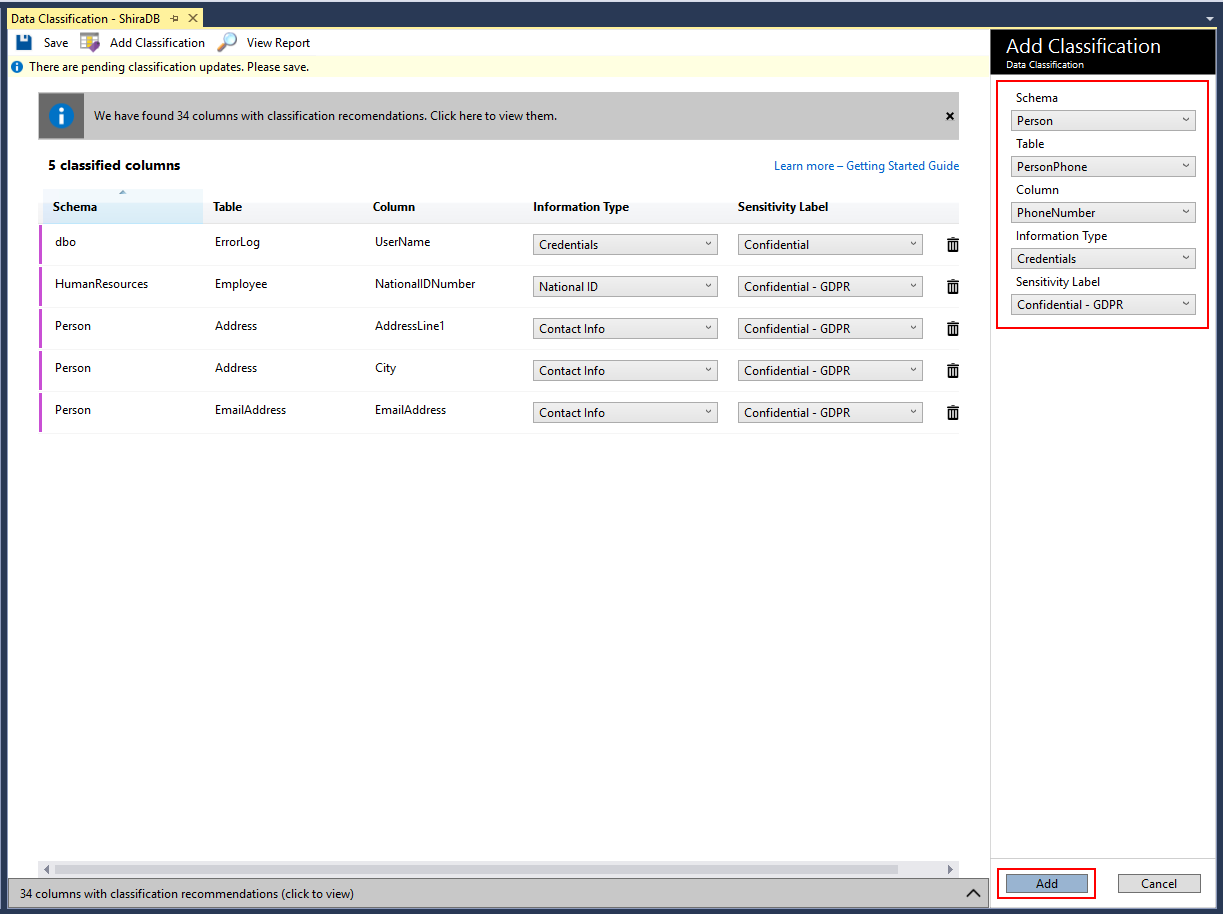
Click on Add classification in the top menu of the window.

-
In the context window that opens, select the schema > table > column that you want to classify, and the information type and sensitivity label. Then click on the blue Add classification button at the bottom of the context window.
-
-
To complete your classification and persistently label (tag) the database columns with the new classification metadata, click on Save in the top menu of the window.

-
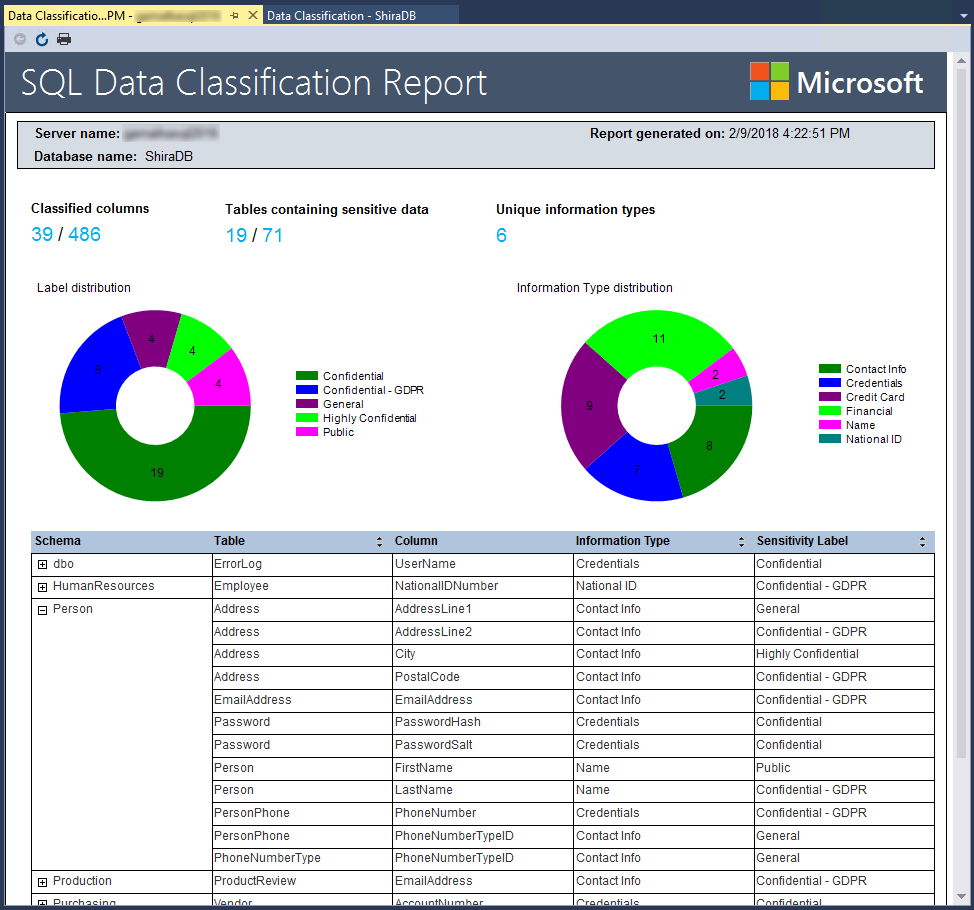
To generate a report with a full summary of the database classification state, click on View Report in the top menu of the window. (You can also generate a report using SSMS. Right click on the database where you would like to generate the report, and choose Tasks > Data Discovery and Classification > Generate Report...)



You can manage the information protection policy using SSMS 18.4 or later:
-
In SQL Server Management Studio (SSMS) connect to the SQL Server.
-
In the SSMS Object Explorer, right click on one of your databases and choose Tasks > Data Discovery and Classification.
The following menu options allow you to manage the information protection policy:
-
Set Information Protection Policy File: uses the information protection policy as defined in the selected JSON file.
-
Export Information Protection Policy: exports the information protection policy to a JSON file.
-
Reset Information Protection Policy: resets the information protection policy to the default information protection policy.
Important
Information protection policy file is not stored in the SQL Server. SSMS uses a default information protection policy. If an information protection policy customized fails, SSMS cannot use the default policy. Data classification fails. To resolve, click Reset Information Protection Policy to use the default policy and re-enable data classification.
SQL Server 2019 introduces sys.sensitivity_classifications system catalog view. This view returns information types and sensitivity labels.
Note
This view requires VIEW ANY SENSITIVITY CLASSIFICATION permission. For more information, see Metadata Visibility Configuration.
On SQL Server 2019 instances, query sys.sensitivity_classifications to review all classified columns with their corresponding classifications. For example:
SELECT
    schema_name(O.schema_id) AS schema_name,
    O.NAME AS table_name,
    C.NAME AS column_name,
    information_type,
	label
FROM sys.sensitivity_classifications sc
    JOIN sys.objects O
    ON  sc.major_id = O.object_id
	JOIN sys.columns C
    ON  sc.major_id = C.object_id  AND sc.minor_id = C.column_id
Prior to SQL Server 2019, the classification metadata for information types and sensitivity labels is in the following Extended Properties:
sys_information_type_namesys_sensitivity_label_name
The metadata can be accessed using the Extended Properties catalog view sys.extended_properties.
For instances of SQL Server 2017 and prior, the following example returns all classified columns with their corresponding classifications:
SELECT
    schema_name(O.schema_id) AS schema_name,
    O.NAME AS table_name,
    C.NAME AS column_name,
    information_type,
    sensitivity_label
FROM
    (
        SELECT
            IT.major_id,
            IT.minor_id,
            IT.information_type,
            L.sensitivity_label
        FROM
        (
            SELECT
                major_id,
                minor_id,
                value AS information_type
            FROM sys.extended_properties
            WHERE NAME = 'sys_information_type_name'
        ) IT
        FULL OUTER JOIN
        (
            SELECT
                major_id,
                minor_id,
                value AS sensitivity_label
            FROM sys.extended_properties
            WHERE NAME = 'sys_sensitivity_label_name'
        ) L
        ON IT.major_id = L.major_id AND IT.minor_id = L.minor_id
    ) EP
    JOIN sys.objects O
    ON  EP.major_id = O.object_id
    JOIN sys.columns C
ON EP.major_id = C.object_id AND EP.minor_id = C.column_idYou can use T-SQL to add/remove column classifications, as well as retrieve all classifications for the entire database.
- Add/update the classification of one or more columns: ADD SENSITIVITY CLASSIFICATION
- Remove the classification from one or more columns: DROP SENSITIVITY CLASSIFICATION
You can use PowerShell Cmdlet to add/remove column classifications, as well as retrieve all classifications and get recommendations for the entire database.
- Get-SqlSensitivityClassification
- Get-SqlSensitivityRecommendations
- Set-SqlSensitivityClassification
- Remove-SqlSensitivityClassification
For Azure SQL Database, see Azure SQL Database Data Discovery & Classification.
Consider protecting your sensitive columns by applying column level security mechanisms:
- Dynamic Data Masking for obfuscating sensitive columns in use.
- Always Encrypted for encrypting sensitive columns at rest.