| title | Task 5: Adding Data Flow Task | Microsoft Docs |
|---|---|
| ms.custom | |
| ms.date | 03/06/2017 |
| ms.prod | sql-server-2014 |
| ms.reviewer | |
| ms.technology | data-quality-services |
| ms.topic | conceptual |
| ms.assetid | ae466627-cc36-4460-a234-fe060f6f01c0 |
| author | lrtoyou1223 |
| ms.author | lle |
| manager | craigg |
In this task, you add a Data Flow Task to the control flow of SSIS package.
-
Drag and drop Data Flow Task from SSIS Toolbox to the Control Flow tab in the SSIS Designer. If you do not see the SSIS Toolbox, click anywhere in the Control Flow tab, click SSIS on the menu bar, and click SSIS Toolbox.
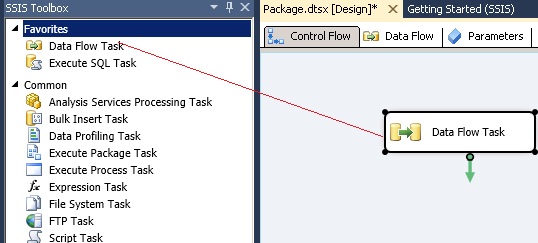
-
Right-click the Data Flow Task in the Control Flow tab and click Rename.
-
Type Receive, Cleanse, Match, and Curate Supplier Data and press ENTER.
-
Double-click the Data Flow Task to switch to the Data Flow tab.
