| title | Task 4: Exporting the Results from Matching Activity to an Excel File | Microsoft Docs |
|---|---|
| ms.custom | |
| ms.date | 03/06/2017 |
| ms.prod | sql-server-2014 |
| ms.reviewer | |
| ms.technology | data-quality-services |
| ms.topic | conceptual |
| ms.assetid | 644454c4-3c5a-469a-90ec-e51dc7fb99fc |
| author | lrtoyou1223 |
| ms.author | lle |
| manager | craigg |
In this task, you export the results from the matching activity to an Excel file.
-
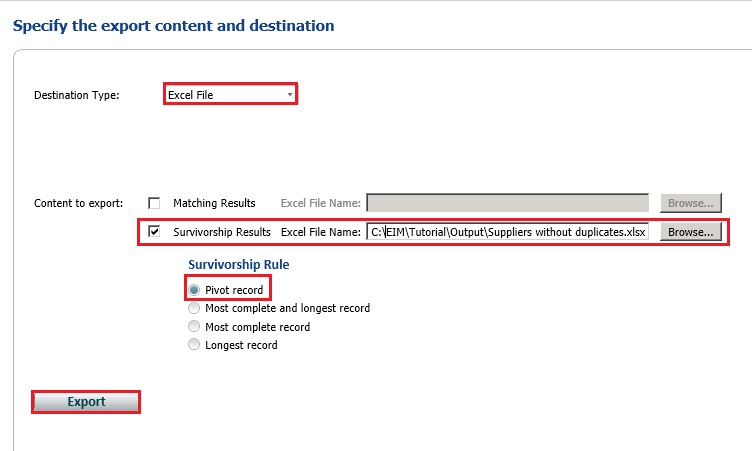
In the Export page, select Excel File for the Destination Type.
-
Select Survivorship Results option. In the survivorship process, DQS determines a survivor record for each cluster based on the Survivorship Rule you selected.
-
Click Browse and navigate to the folder where you want to store the output file.
-
Type Cleansed and Matched Suppliers.xls for the name and click Open.
-
Confirm that Pivot Record is selected for the Survivorship Rule. When you select this option, the pivot record for each cluster is picked for the output from a cluster. The other options for the Survivorship Rule are:
-
Most complete record: Survivor record is the one with the largest number of populated fields.
-
Longest record: Survivor record is the one with the largest number of terms in source fields.
-
Most complete and longest record: Survivor record is the one with the largest number of populated fields, and has the largest number of terms in each field.
-
-
Click Export to export the results to an Excel file.
-
Click Close to close the Matching Export dialog box.
-
Click Finish to finish the matching activity.
-
Open the Cleansed and Matched Suppliers.xlsx file and confirm that you do not see any duplicates (SupplierID).

Now, you have supplier data that has been cleansed and matched to remove duplicates.