| title | Quickstart for working with inputs and outputs in R - SQL Server Machine Learning |
|---|---|
| description | In this quickstart for R script in SQL Server, learn how to structure inputs and outputs to the sp_execute_external_script system stored procedure. |
| ms.prod | sql |
| ms.technology | machine-learning |
| ms.date | 01/04/2019 |
| ms.topic | quickstart |
| author | dphansen |
| ms.author | davidph |
| manager | cgronlun |
[!INCLUDEappliesto-ss-xxxx-xxxx-xxx-md-winonly]
This quickstart shows how to handle inputs and outputs when using R in SQL Server Machine Learning Services or R Services.
When you want to run R code in SQL Server, you must wrap R script in a stored procedure. You can write one, or pass R script to sp_execute_external_script. This system stored procedure is used to start the R runtime in the context of SQL Server, which passes data to R, manages R user sessions securely, and returns any results to the client.
By default, sp_execute_external_script accepts a single input dataset, which typically you supply in the form of a valid SQL query. Other types of input can be passed as SQL variables.
The stored procedure returns a single R data frame as output, but you can also output scalars and models as variables. For example, you can output a trained model as a binary variable and pass that to a T-SQL INSERT statement, to write that model to a table. You can also generate plots (in binary format) or scalars (individual values, such as the date and time, the time elapsed to train the model, and so forth).
A previous quickstart, Verify R exists in SQL Server, provides information and links for setting up the R environment required for this quickstart.
Create a small table of test data by running the following T-SQL statement:
CREATE TABLE RTestData (col1 INT NOT NULL)
INSERT INTO RTestData VALUES (1);
INSERT INTO RTestData VALUES (10);
INSERT INTO RTestData VALUES (100);
GO
When the table has been created, use the following statement to query the table:
SELECT * FROM RTestDataResults

Let's look at the default input and output variables of sp_execute_external_script: InputDataSet and OutputDataSet.
-
You can get the data from the table as input to your R script. Run the statement below. It gets the data from the table, makes a round trip through the R runtime, and returns the values with the column name NewColName.
The data returned by the query is passed to the R runtime, which returns the data to SQL Database as a data frame. The WITH RESULT SETS clause defines the schema of the returned data table for SQL Database.
EXECUTE sp_execute_external_script
    @language = N'R'
    , @script = N'OutputDataSet <- InputDataSet;'
    , @input_data_1 = N'SELECT * FROM RTestData;'
WITH RESULT SETS (([NewColName] INT NOT NULL));
Results
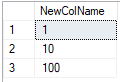
-
Let's change the name of the input or output variables. The script above used the default input and output variable names, InputDataSet and OutputDataSet. To define the input data associated with InputDatSet, you use the @input_data_1 variable.
In this script, the names of the output and input variables for the stored procedure have been changed to SQL_out and SQL_in:
EXECUTE sp_execute_external_script
  @language = N'R'
  , @script = N' SQL_out <- SQL_in;'
  , @input_data_1 = N'SELECT 12 as Col;'
  , @input_data_1_name  = N'SQL_in'
  , @output_data_1_name =  N'SQL_out'
  WITH RESULT SETS (([NewColName] INT NOT NULL));
Note that R is case-sensitive, so the case of the input and output variables in
@input_data_1_nameand@output_data_1_namehave to match the ones in the R code in@script.Only one input dataset can be passed as a parameter, and you can return only one dataset. However, you can call other datasets from inside your R code and you can return outputs of other types in addition to the dataset. You can also add the OUTPUT keyword to any parameter to have it returned with the results.
The
WITH RESULT SETSstatement defines the schema for the data which is used in SQL Server. You need to provide SQL compatible data types for each column you return from R. You can use the schema definition to provide new column names too as you do not need to use the column names from the R data frame. -
You can also generate values using the R script and leave the input query string in @input_data_1 blank.
EXECUTE sp_execute_external_script
    @language = N'R'
    , @script = N' mytextvariable <- c("hello", " ", "world");
        OutputDataSet <- as.data.frame(mytextvariable);'
    , @input_data_1 = N''
WITH RESULT SETS (([Col1] CHAR(20) NOT NULL));
Results


Examine some of the problems that you might encounter when passing data between R and SQL Server, such as implicit conversions and differences in tabular data between R and SQL.
[!div class="nextstepaction"] Quickstart: Handle data types and objects