| title | Ingest data into a SQL Server data pool |
|---|---|
| titleSuffix | SQL Server 2019 big data clusters |
| description | This tutorial demonstrates how to ingest data into the data pool of a SQL Server 2019 big data cluster (preview) with the sp_data_pool_table_insert_data stored procedure. |
| author | rothja |
| ms.author | jroth |
| manager | craigg |
| ms.date | 12/07/2018 |
| ms.topic | tutorial |
| ms.prod | sql |
| ms.custom | seodec18 |
This tutorial demonstrates how to use Transact-SQL to load data into the data pool of a SQL Server 2019 big data cluster (preview). With SQL Server big data clusters, data from a variety of sources can be ingested and distributed across data pool instances.
In this tutorial, you learn how to:
[!div class="checklist"]
- Create an external table in the data pool.
- Insert sample web clickstream data into the data pool table.
- Join data in the data pool table with local tables.
Tip
If you prefer, you can download and run a script for the commands in this tutorial. For instructions, see the Data pools samples on GitHub.
- Loaded sample data in your big data cluster
- Big data tools
- kubectl
- Azure Data Studio
- SQL Server 2019 extension
The following steps create an external table in the data pool named web_clickstream_clicks_data_pool. This table can then be used as a location for ingesting data into the big data cluster.
-
In Azure Data Studio, connect to the SQL Server master instance of your big data cluster. For more information, see Connect to the SQL Server master instance.
-
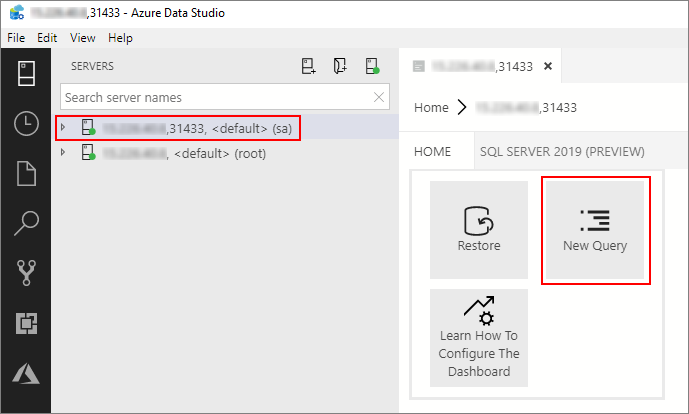
Double-click on the connection in the Servers window to show the server dashboard for the SQL Server master instance. Select New Query.
-
Run the following Transact-SQL command to change the context to the Sales database in the master instance.
USE Sales
GO
-
Create an external table named web_clickstream_clicks_data_pool in the data pool. The
SqlDataPooldata source is a special data source type that can be used from the master instance of any big data cluster.IF NOT EXISTS(SELECT * FROM sys.external_tables WHERE name = 'web_clickstream_clicks_data_pool') CREATE EXTERNAL TABLE [web_clickstream_clicks_data_pool] ("wcs_user_sk" BIGINT , "i_category_id" BIGINT , "clicks" BIGINT) WITH ( DATA_SOURCE = SqlDataPool, DISTRIBUTION = ROUND_ROBIN );
-
In CTP 2.2, the creation of the data pool is asynchronous, but there is no way to determine when it completes yet. Wait for two minutes to make sure the data pool is created before continuing.

The following steps ingest sample web clickstream data into the data pool using the external table created in the previous steps.
-
Define variables for the query that you want to use to insert data into the data pool. Then use the model..sp_data_pool_table_insert_data stored procedure to insert the results from the query into the data pool (the web_clickstream_clicks_data_pool external table).
DECLARE @db_name SYSNAME = 'Sales'
DECLARE @schema_name SYSNAME = 'dbo'
DECLARE @table_name SYSNAME = 'web_clickstream_clicks_data_pool'
DECLARE @query NVARCHAR(MAX) = '
SELECT wcs_user_sk, i_category_id, COUNT_BIG(*) as clicks
FROM sales.dbo.web_clickstreams
INNER JOIN sales.dbo.item it ON (wcs_item_sk = i_item_sk
   AND wcs_user_sk IS NOT NULL)
GROUP BY wcs_user_sk, i_category_id
HAVING COUNT_BIG(*) > 100;'

EXEC model..sp_data_pool_table_insert_data @db_name, @schema_name, @table_name, @query
-
Inspect the inserted data with two SELECT queries.
SELECT count(*) FROM [dbo].[web_clickstream_clicks_data_pool]
SELECT TOP 10 * FROM [dbo].[web_clickstream_clicks_data_pool]
Join the stored results from the query in the data pool with local data in the Sales table.
SELECT TOP (100)
   w.wcs_user_sk,
   SUM( CASE WHEN i.i_category = 'Books' THEN 1 ELSE 0 END) AS book_category_clicks,
   SUM( CASE WHEN w.i_category_id = 1 THEN 1 ELSE 0 END) AS [Home & Kitchen],
   SUM( CASE WHEN w.i_category_id = 2 THEN 1 ELSE 0 END) AS [Music],
   SUM( CASE WHEN w.i_category_id = 3 THEN 1 ELSE 0 END) AS [Books],
   SUM( CASE WHEN w.i_category_id = 4 THEN 1 ELSE 0 END) AS [Clothing & Accessories],
   SUM( CASE WHEN w.i_category_id = 5 THEN 1 ELSE 0 END) AS [Electronics],
   SUM( CASE WHEN w.i_category_id = 6 THEN 1 ELSE 0 END) AS [Tools & Home Improvement],
   SUM( CASE WHEN w.i_category_id = 7 THEN 1 ELSE 0 END) AS [Toys & Games],
   SUM( CASE WHEN w.i_category_id = 8 THEN 1 ELSE 0 END) AS [Movies & TV],
   SUM( CASE WHEN w.i_category_id = 9 THEN 1 ELSE 0 END) AS [Sports & Outdoors]
FROM [dbo].[web_clickstream_clicks_data_pool] as w
INNER JOIN (SELECT DISTINCT i_category_id, i_category FROM item) as i
   ON i.i_category_id = w.i_category_id
GROUP BY w.wcs_user_sk;Use the following command to remove the database objects created in this tutorial.
DROP EXTERNAL TABLE [dbo].[web_clickstream_clicks_data_pool];Learn about how to ingest data into the data pool with Spark jobs:
[!div class="nextstepaction"] Ingest data with Spark jobs