| title | View the SQL Server Error Log (SQL Server Management Studio) | Microsoft Docs | |||||
|---|---|---|---|---|---|---|
| ms.custom | ||||||
| ms.date | 07/29/2016 | |||||
| ms.prod | sql-server-2016 | |||||
| ms.reviewer | ||||||
| ms.suite | ||||||
| ms.technology |
|
|||||
| ms.tgt_pltfrm | ||||||
| ms.topic | article | |||||
| helpviewer_keywords |
|
|||||
| ms.assetid | 55f468ba-146c-4ab3-95cd-d35d051afd12 | |||||
| caps.latest.revision | 14 | |||||
| author | JennieHubbard | |||||
| ms.author | jhubbard | |||||
| manager | jhubbard |
The [!INCLUDEssNoVersion] error log contains user-defined events and certain system events you will want for troubleshooting.
- In SSMS, select Object Explorer
To open Object Explorer: Keyboard shortcuy is F8. Or, on the top menu, click View/Object Explorer

-
In Object Explorer, connect to an instance of the SQL Server and then expand that instance.
-
Find and expand the Management section (Assuming you have permissions to see it).
-
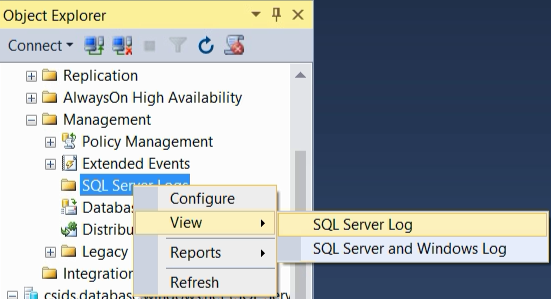
Right-click on SQL Server Logs, select View, and choose View SQL Server Log.
-
The Log File Viewer will appear (It might take a minute) with a list of logs for you to view.
-
Several people have recommended MSSQLTips.com's helpful post Identify location of the SQL Server Error Log file. They have a lot of terrific information - be sure to check them out!
