What Google I/O '26 means for developing agents on Google Cloud
Addy Osmani
Director, Google Cloud AI
Alan Blount
Product Manager, Google Cloud
At Google I/O, we introduced a unified development toolkit featuring Antigravity 2.0 and the Managed Agents API, giving developers better ways to build locally and deploy securely to the cloud on a shared protocol layer. In this blog, we’re going to show you how Gemini Enterprise Agent Platform and the new developer tools shared at I/O fit together, unpack the spectrum of choice for building, and share what we’d actually try first.
Following the evolution of Vertex AI into the Gemini Enterprise Agent Platform – a comprehensive platform to build, scale, govern, and optimize agents with new features like session memory and centralized governance – we are now extending these capabilities directly into your local development tools. Our goal is to bridge the gap between high-speed prototyping and secure, compliant corporate deployment, offering a modular approach where you can choose between quick-start workflows or full production control to fit your stack's specific needs.
Here’s how those pieces now lay out across the entire spectrum of choice.
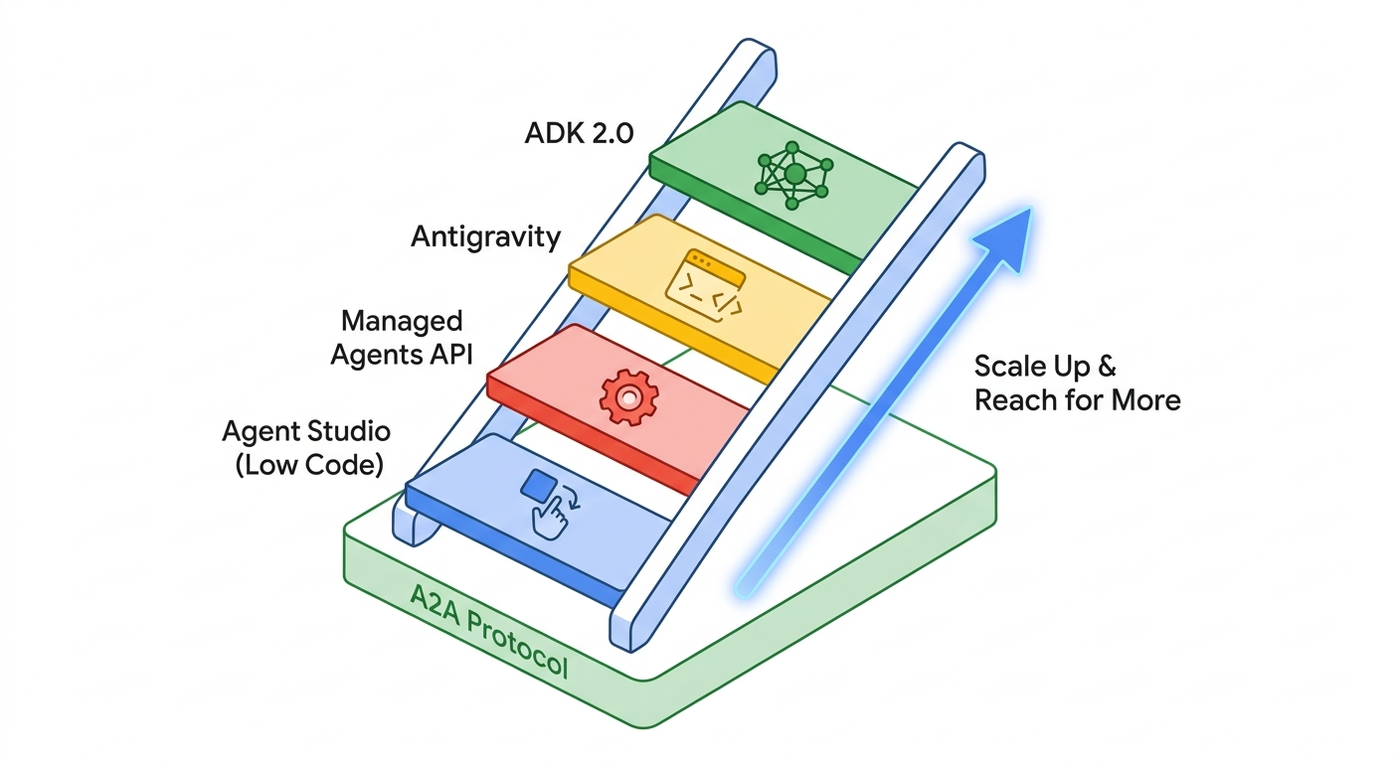
The four rungs: The spectrum of how to build agents
We like to think of the agent development ecosystem as four rungs on a ladder, designed to give you a clear slider between out-of-the-box configuration and complete code-first control. They're deliberately additive, meaning that starting fast on the lower rungs above never locks you out of graduating to the deeper customization of the rungs above.
Underneath all four rungs is the A2A protocol. This interoperability ensures that an agent built on the first rung can be called as a sub-agent on the fourth rung, allowing your entire architecture to scale seamlessly on the same infrastructure.
Rung one: Agent Studio (low code)
A visual workspace inside Agent Platform. You discover models in Model Garden, engineer prompts, wire up tools, and ship an agent without writing code. Best for business-facing teams and rapid prototyping. The agent you build here runs on the exact same runtime as everything below it.
Rung two: Managed Agents API
New at I/O, the Managed Agents API is for technical teams who want to “manage the mission, not the machine." It allows you to define agentic behavior and let Google Cloud handle the heavy lifting, acting as an agent-as-a-service with nothing to manage.
You use the Managed Agents API to configure your agent, and the Interactions API to invoke it. You package your instructions, skills, and tools, POST them, and Gemini builds and runs the agent.
What makes this deployable is the Google Cloud sandbox, which is secure by design. The agent harness runs on our servers, and each agent has its own ephemeral sandbox provisioned with your skills, Model Context Protocol (MCP) servers, and server-side tools. Full integration with A2A and Agent Platform governance and security are coming soon.

Rung three: Antigravity and friends
Antigravity is our primary solution for developers looking to leverage AI for coding tasks and agent orchestration, enabling teams to transform how apps are built and deployed. We've consolidated our developer-facing coding strategy into this single, powerful harness shared across multiple surfaces.
It’s co-optimized with the Gemini family of models, offering high efficiency to speed up development cycles and reduce costs. Skills you develop with Antigravity are intended to be portable across different surfaces.
This is for development teams who want to utilize Google's advanced reasoning capabilities within their coding workflows, implement custom development loops, and transform how they build, deploy, and manage applications.
Today, we are expanding this with new tools:
-
Antigravity 2.0: A new standalone desktop application providing a centralized workspace to steer, customize, and orchestrate coding agents. Developers can use this to manage complex tasks, such as orchestrating agents to refactor code, generate unit tests, or even scaffold new service components based on a specification. Agents can spin subagents from a single prompt, while multi-agent orchestration allows tasks to run in parallel.
-
Antigravity CLI: This brings the full Antigravity experience to the command line: same harness, same agent, same quality of intelligence as Antigravity 2.0, with a product experience tailored for the terminal. It's optimized for speed and lower overhead, and adapts entirely to you. The CLI is tightly integrated with the desktop app, sharing authentication, context, skills, and configurations, providing a consistent experience across both interfaces. Use the Antigravity SDK to build your own runtime.
- Enterprise security and compliance: Google Cloud customers can now use Antigravity 2.0 and Antigravity CLI with their Gemini Enterprise Agent Platform project. All you have to do is to log in with Cloud OAuth, set your Agent Platform Project ID and region. This ensures that all agent inference runs via Agent Platform models within your secure cloud boundary, inheriting Google Cloud’s standard data privacy protections and Terms of Service. This ensures your customer data is in your control , and you can utilize regional model endpoints.

Integrating other coding agents
While Antigravity is our recommended agentic coding solution, Google Cloud is designed to work well with any coding agent you choose. Our platform is open, and we provide tools to ensure flexibility:
-
The Agent CLI and Agent Development Kit (ADK) allow you to build and interact with agents from various sources, including tools like Claude Code. This means developers can often keep their preferred interfaces while running the underlying AI inference on Google Cloud. This approach ensures your workflows benefit from Google Cloud's security, compliance, and infrastructure.
-
Our Skills for Google products, launched at Next, are designed to be compatible with multiple coding tools, enabling you to enhance different agents with a consistent set of capabilities.
This flexibility allows teams to integrate their existing favorite tools and models, ensuring seamless and compliant operation within their established workflows.
Rung four: Agent Development Kit (ADK 2.0)
Code-first, low floor, high ceiling. If Managed Agents are configuration-first, ADK is engineering-first. This is for software engineers who want to build custom agent meshes from the ground up - any architecture, any model, unconstrained.
ADK enhancements launched at Google Cloud Next are now available for everyone. It introduces a unified graph-based engine that gives you a slider from dynamic, model-led reasoning to strict, deterministic workflows. The framework handles the heavy lifting of multi-agent coordination, managing how sub-agents, tools, and data pass between one another.
-
Collaborative workflows (Python v2.0.0): Previously called the Task-based Agent Collaboration API, this is how you build self-managing agent teams. A coordinator delegates to subagents using explicit operating modes:
- chat: Full user interaction, manual return to parent, this is “handoff conversation to sub-agents”.
- task: User interaction for clarifications, automatic return to parent, this is a new “collaborate for this assignment” which is the best of both other options.
- single-turn: No user interaction, parallel execution, automatic return, this is “agent as tool”.
-
Dynamic workflows: Dynamic workflows in ADK allow you to put aside graph-based path structures and use the full power of your chosen programming language to build workflows. With Dynamic workflows, you can create workflows with simple decorators, invoke workflow nodes as functions, and build complex routing logic.
-
ADK Kotlin (Beta): "ADK for Android." Kotlin support joins Python, Go, and Java, increasing language coverage so your on-device mobile agents can seamlessly coordinate with your backend Python agents.
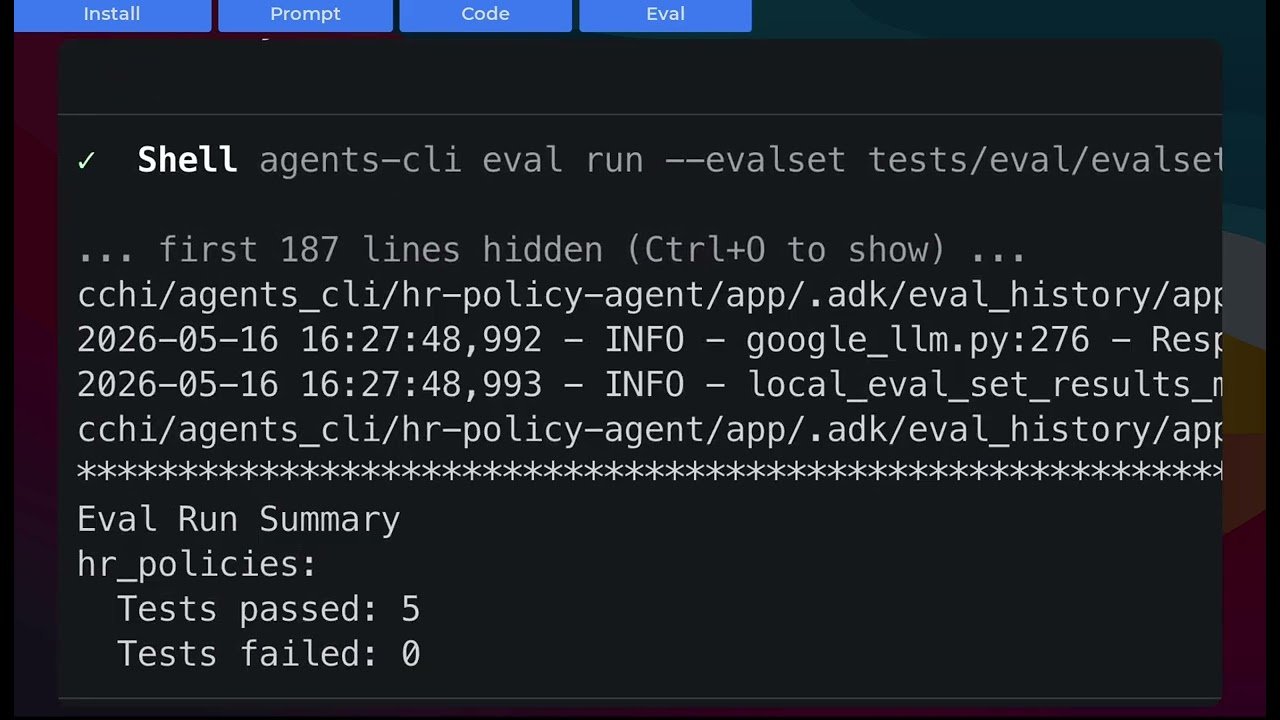
Finally, the Agents CLI packages Google's expert skills for ADK, eval, deploy, observability, and publishing - turning any AI coding agent (like Antigravity, Gemini CLI, Claude Code, or Cursor) into an expert at agent app building as well as agent ops. It gives your AI Agent skills to understand the Google Cloud agent stack, turning an expansive ecosystem into a seamless assembly line for developers hillclimbing their agent builds.
What we'd actually try first
If we were starting today, here's the order we'd reach for things:
-
Start with the Antigravity 2.0 desktop app: Explore the interface, add a pre-built agent, and interact with it to understand the core functionality. This provides a more intuitive entry point before diving into API specifics.
-
Build a mesh: Feel free to explore Managed Agents API through the Agents API skill and Interactions API skill. When you start hitting routing decisions you want to make explicit, or need complex multi-agent orchestration, port your logic to ADK 2.0. The graph model is worth the learning curve as soon as you have more than two branching paths. Don't worry about stringing together a bunch of separate pieces to make this happen - this is exactly where the Agents CLI shines.
-
Govern and reuse shared domain logic: Check out Skill Registry (public preview): A centralized catalog to govern and promote the reuse of packaged domain logic. Skills are accessible via the Managed Agents API, Agent Platform SDK, and ADK (via SkillToolset). Skill Registry will be part of Agent Registry shortly.
-
Evaluate: Use the Gemini Enterprise Agent Platform evaluation suite to move beyond basic text-matching vibe checks. Leverage synthetic user simulation to auto-generate multi-turn testing scenarios and safely mock API environments to pressure-test tool resilience. Finally, utilize its LLM-based autoraters and trace logging to evaluate complex logic, group failures, and continuously optimize your agent.
-
Secure the pipeline: Leverage Gemini Enterprise Agent Platform governance capabilities like Agent Identity, Agent Gateway, Agent Security, and Agent Registry to secure your deployment. Once CodeMender releases, add it to your CI/CD to proactively secure the code your human (and AI) developers are pushing.
Note: You can do this whole loop on a Google Cloud Starter Tier account without a billing account attached. First two app deployments are on us.
We’re excited and hope you are, too
The agent space is evolving rapidly. Agent Platform offers a secure and adaptable foundation. Core components like the Agent Gateway, identity management, and the Skill Registry work together to ensure a robust and controlled environment for your agents, enabling you to innovate flexibly without vendor lock-in.
Pick the rung that fits the project. Bring whatever coding agent your team prefers. The platform you graduate to is the same one either way, and the data stays inside your Cloud project the whole time.
If you only read one set of docs after this post, make it the Agents overview in the Agent Platform documentation. If you build something interesting, show us - the best examples will land in the next round of templates.
We can’t wait to see what you build!